
Messaging and events
TIBCO EMS integration
TIBCO Enterprise Message Service (EMS) is a JMS-compliant messaging server used in many enterprise integration landscapes. ECOM connects EMS queues and topics to EDI partners, files, APIs and your ERP, and supports moves from older integration platforms.
- Vendor
- TIBCO
- Standard
- Java Message Service (JMS)
- Destinations
- Queues and topics
- Availability
- Fault-tolerant server pairs
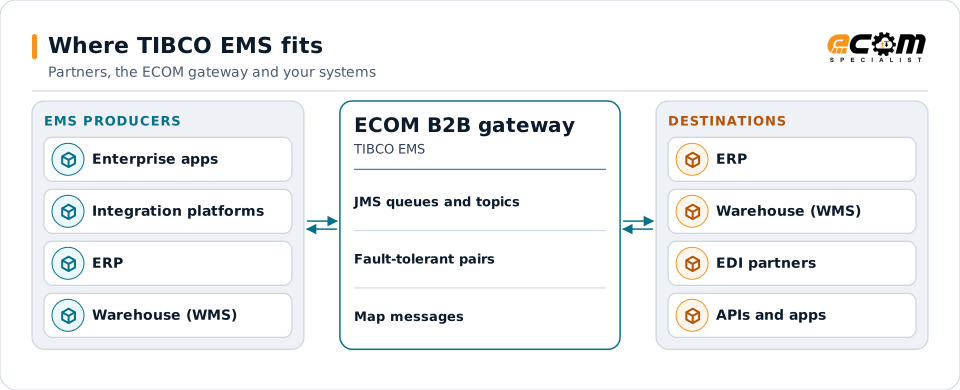
The gateway connects an EMS backbone to partners and other platforms.
Overview
What TIBCO EMS is
EMS is a messaging server that implements JMS. Applications send messages to queues or topics; consumers receive them with acknowledgment or in transactions. Durable subscribers receive topic messages sent while they were away.
Servers can run in fault-tolerant pairs that share storage, so clients reconnect to the backup if the primary fails. Routes connect servers so messages can flow between sites.
Where businesses use it
Enterprise integration
Backbone messaging for integration platforms and enterprise applications.
Order and logistics flows
Orders, shipments and inventory events between systems.
Platform modernization
Connecting EMS-based flows to newer platforms during a move.
How it works
How EMS messaging works
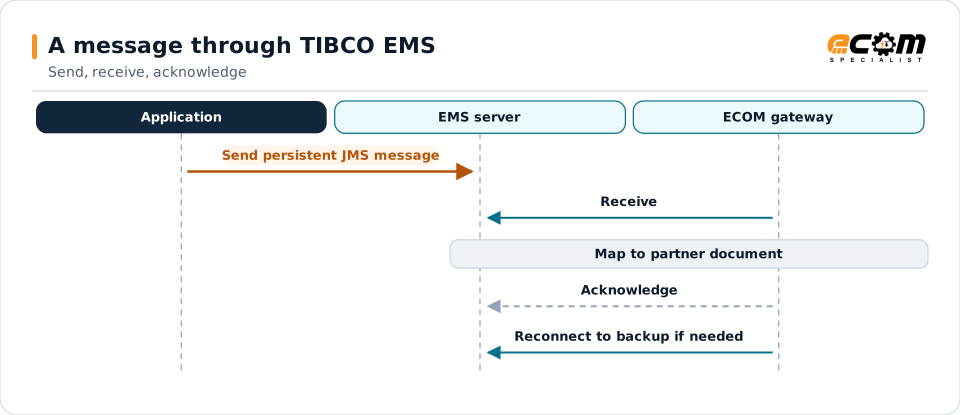
A client connects to the EMS server, creates a session and sends a JMS message with headers, properties and a body (text, map, bytes or object) to a destination. Persistent messages are stored until delivered and acknowledged.
Consumers receive from queues or subscribe to topics, optionally with selectors. Messages that cannot be delivered or expire can be routed to an undelivered message queue.
The acknowledgment removes the message. A fault-tolerant pair lets clients reconnect if the primary server fails.
In depth
EMS integration in practice
JMS semantics
Persistent delivery, acknowledgment modes and transactions keep messages safe.
Durable subscribers
Topic subscribers that must not miss messages use durable subscriptions.
Fault tolerance
Clients are configured with both servers of a fault-tolerant pair.
Selectors and properties
Properties such as document type route messages to the right consumer.
Undelivered messages
Expired or undeliverable messages are captured for review.
Security
TLS connections and user permissions on destinations.
In practice
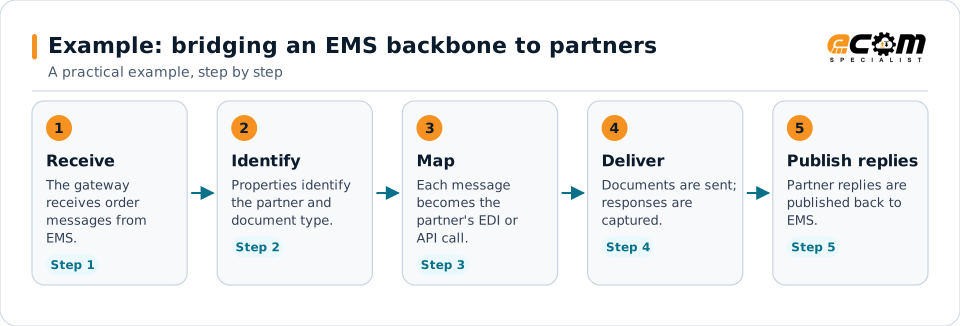
Example: bridging an EMS backbone to partners
Internal systems exchange orders on EMS. Partners need EDI, and some need APIs.
The EMS backbone stays as it is; the gateway handles the partner side in both directions.
Connections
How TIBCO EMS connects your business
Trading partners
EDI documents from partners become EMS messages for internal systems, and events become partner documents.
ERP and business systems
Orders, shipments, inventory and invoices move between applications as events, without point-to-point links.
APIs and files
The same data can be published to APIs or written to files for systems that do not read the platform.
Business workflows
Order-to-cash and fulfillment steps react to events as they happen.
ECOM
How ECOM supports TIBCO EMS
ECOM supports TIBCO EMS with dedicated implementation, mapping, communication and support teams, and with specialists who know the industries your partners work in.
Implementation team
Plans the TIBCO EMS setup with you, configures it on the gateway and runs the tests with your partners and systems.
Mapping team
Builds and maintains the maps, code conversions and validation rules between partner data and your applications.
Communication team
Sets up and monitors partner connections, certificates, keys and credentials, and coordinates changes with each partner.
Support team
Watches the flows, investigates failed or missing documents, and works the issue through with you and your partner.
For TIBCO EMS in particular
- JMS connections to TIBCO EMS, including fault-tolerant server pairs and durable subscriptions.
- Mapping between EMS messages and EDI, XML, JSON, files and your ERP, with validation.
- Monitoring of queues, subscriptions and failed messages, with alerts and a clear path to reprocess.
Frequently asked questions
Is TIBCO EMS a JMS server?
Yes. EMS implements the Java Message Service standard, with queues, topics, acknowledgments and transactions.
What happens if the EMS server fails?
In a fault-tolerant pair, clients reconnect to the backup server, which takes over with the shared message store.
Can ECOM connect EMS flows to EDI partners?
Yes. EMS messages are mapped to partner documents and partner replies are published back to EMS.
Can ECOM help move away from an older integration platform?
Yes. Flows can be connected through the gateway first and moved step by step, keeping EMS in place until each flow is replaced.
Talk to an EDI/API Expert
Tell us which partners, systems and TIBCO EMS requirements you are working with. An ECOM specialist will review them with you and outline the setup, the maps and the tests.