
Messaging and events
IBM MQ integration
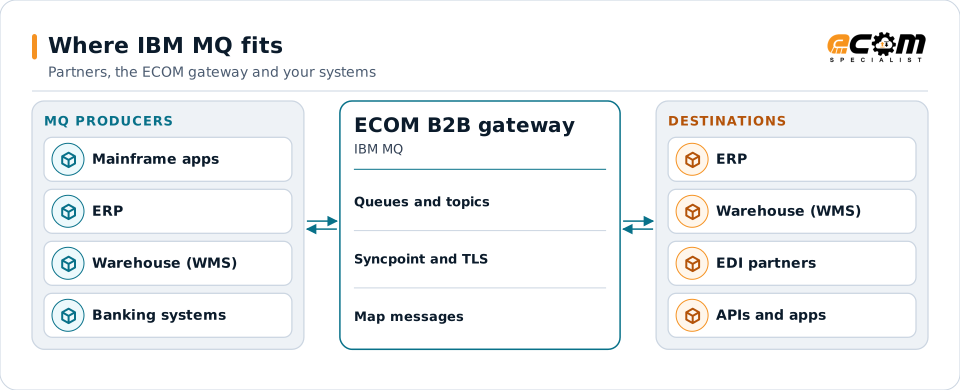
IBM MQ is enterprise messaging middleware that moves messages between applications reliably, even when one side is offline. Many banks, retailers, manufacturers and logistics companies run core flows on it. ECOM connects MQ queues to EDI partners, ERP systems, files and APIs.
- Vendor
- IBM
- Model
- Queue managers, queues, topics
- Delivery
- Persistent, transactional messaging
- Interfaces
- MQI, JMS, AMQP, MQTT, REST
Applications put and get MQ messages; the gateway connects those queues to partners and other systems.
Overview
What IBM MQ is
IBM MQ stores messages in queues managed by a queue manager. An application puts a message on a queue and carries on; another application gets it when ready. Persistent messages survive restarts, and puts and gets can be part of a transaction, so a message is never lost or processed twice by mistake.
Queue managers connect to each other through channels, often protected with TLS, so messages can travel between data centers, clouds and partners. Publish and subscribe topics deliver one message to many subscribers.
Where businesses use it
Core transaction flows
Orders, payments and inventory updates between mainframe, ERP and newer applications.
B2B gateways
Delivering partner documents to internal systems through queues.
Hybrid cloud
Linking on-premises systems with cloud applications.
How it works
How IBM MQ messaging works
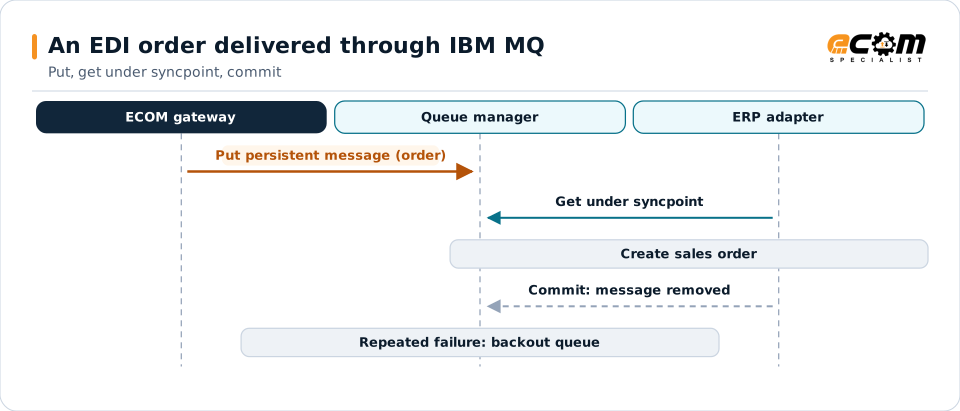
An application connects to a queue manager, opens a queue and puts a message with headers (the MQMD) and a body. The message waits on the queue until a consumer gets it, under syncpoint so it is removed only when the consumer commits.
If processing fails repeatedly, the message moves to a backout queue or the dead-letter queue instead of blocking the queue. Channels move messages between queue managers with their own retry and TLS settings.
The message stays on the queue until the consumer commits. A message that keeps failing moves aside instead of blocking the rest.
In depth
IBM MQ integration in practice
Persistence and transactions
Persistent messages and syncpoint keep business data safe across failures.
Message headers
MQMD and properties carry IDs, correlation IDs, formats and reply-to queues used for routing and request/reply.
Channels and TLS
Client and server channels are secured with TLS and channel authentication rules.
Poison messages
Backout thresholds move failing messages aside for review.
Message formats
Bodies may be XML, JSON, fixed-width or EDI; they are mapped like any other format.
Clusters and high availability
Queue manager clusters and high-availability setups are part of the design where used.
In practice
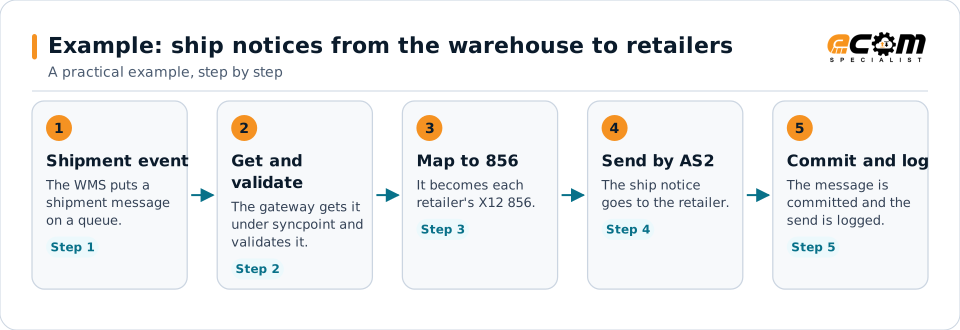
Example: ship notices from the warehouse to retailers
The warehouse system publishes shipment events on MQ. Retailers need EDI ship notices.
The queue decouples the warehouse from the retailers; the gateway turns events into partner documents.
Connections
How IBM MQ connects your business
Trading partners
EDI documents from partners become IBM MQ messages for internal systems, and events become partner documents.
ERP and business systems
Orders, shipments, inventory and invoices move between applications as events, without point-to-point links.
APIs and files
The same data can be published to APIs or written to files for systems that do not read the platform.
Business workflows
Order-to-cash and fulfillment steps react to events as they happen.
ECOM
How ECOM supports IBM MQ
ECOM supports IBM MQ with dedicated implementation, mapping, communication and support teams, and with specialists who know the industries your partners work in.
Implementation team
Plans the IBM MQ setup with you, configures it on the gateway and runs the tests with your partners and systems.
Mapping team
Builds and maintains the maps, code conversions and validation rules between partner data and your applications.
Communication team
Sets up and monitors partner connections, certificates, keys and credentials, and coordinates changes with each partner.
Support team
Watches the flows, investigates failed or missing documents, and works the issue through with you and your partner.
For IBM MQ in particular
- IBM MQ client connections, queues, channels and TLS set up with your MQ administrators.
- ECOM's IBM specialists also support MQ administration and upgrades.
- Mapping between IBM MQ messages and EDI, XML, JSON, files and your ERP, with validation.
- Monitoring of queues, subscriptions and failed messages, with alerts and a clear path to reprocess.
Frequently asked questions
Can EDI documents be delivered to IBM MQ queues?
Yes. Translated partner documents are put on the queues your applications read, and messages from your applications become EDI documents for partners.
How is message loss prevented?
With persistent messages and transactional gets: a message is removed only when the consumer commits.
What happens to messages that keep failing?
After the backout threshold they move to a backout or dead-letter queue for review, so other messages keep flowing.
Does ECOM support MQ administration?
ECOM's IBM specialists support IBM MQ administration and upgrades as part of its IBM services.
Talk to an EDI/API Expert
Tell us which partners, systems and IBM MQ requirements you are working with. An ECOM specialist will review them with you and outline the setup, the maps and the tests.