Executive summary
The situation and ECOM’s role
A building products distributor sources products from many suppliers and supplies independent dealers across several product categories. Supplier product, price and availability data arrives in different forms and has to reach ordering systems, and dealers vary in size, with many ordering by browser, phone or email.
ECOM operates the EDI exchange, provides the API Gateway for internal and external integrations, provides WebEDI for partners without EDI, and provides Reconcile360 to match dealer payments and supplier invoices to the right orders.
A distributor’s catalog is only as good as the newest supplier price file it received.
Customer environment
- Industry
- Building products distribution across several product categories.
- Partners
- Many suppliers upstream; independent dealers downstream.
- ECOM scope
- EDI operations, API Gateway, WebEDI and Reconcile360.
About this profile: the customer is not named and details are generalized. What is stated about the customer comes from ECOM; text marked “industry context” describes how this kind of business typically works. No volumes, timelines, figures, quotes or measured results are published.
The challenge
Many suppliers, many dealers, one set of ordering systems
Industry context: suppliers provide product, price and availability data in many forms, from standard catalog and price documents (X12 832 and 846) to spreadsheets, and a distributor has to bring all of it into one catalog and keep it current. Stale prices or unavailable items shown to dealers create orders that cannot be filled as promised.
Dealers order the other way. Larger dealers can send 850 purchase orders and receive 855 acknowledgments, 856 ship notices and 810 invoices. Many smaller dealers use a browser, the phone or email, and those orders must still end up in the same ordering system accurately. Building products add their own complexity: bulk and mixed loads, yard and delivery logistics, project-driven quantities and frequent substitutions.
Money has to be matched on both sides. Dealer payments must be applied to the right orders and invoices, and supplier invoices must be checked against what was ordered and received. When the records disagree, the distributor is the one left holding the difference.
Why ECOM
A managed route for suppliers and dealers alike
ECOM operates the EDI exchange with suppliers and dealers that use it, so it is run by a team that handles these exchanges daily; mapping changes and onboarding follow the agreed scope. One integration pattern connects the distributor’s applications with outside parties.
A browser route lets smaller dealers order within the same controlled process, and payment matching starts from records that agree.
Industry context
Building products distributor serving independent dealers
A building-products distributor sources products from many suppliers and supplies independent dealers across several product categories. The value it adds is choice and availability, which depends on current product, price and availability data from suppliers and on making it easy for dealers to order.
Supplier data in many forms
Product, price and availability data arrives in different forms and must reach the ordering systems.
Dealers vary in size
Many dealers order by browser, phone or email rather than by EDI.
Payments touch both sides
Dealer payments and supplier invoices have to be matched to the right orders.
Where it goes wrong
Typical problems in this kind of exchange
-
Supplier data does not line up
Each supplier sends product and price data differently.
Ordering systems carry stale or wrong data.
-
Dealers order every which way
Smaller dealers use browsers, phone or email.
Staff re-key orders and chase details.
-
Matching payments and invoices
Dealer payments and supplier invoices relate to different orders.
Finance matches by hand.
What ECOM provides
The confirmed scope of services
-
EDI operations
ECOM runs the EDI exchange with the customer’s trading partners.
About EDI operations -
API Gateway
PRISM-API Gateway carries the integrations between the customer’s own applications and with outside parties, so internal and external connections follow one pattern.
About API Gateway -
WebEDI
PRISM-WebEDI lets trading partners without an EDI system exchange transactions through a browser.
About WebEDI -
Reconcile360
PRISM Reconcile360 matches remittance advice, bank deposits and open invoices, and flags differences for review.
About Reconcile360
What ECOM is responsible for
- ECOM operates the EDI exchange with suppliers and dealers.
- The API Gateway carries integrations between the distributor’s applications and with outside parties.
- WebEDI gives partners without EDI a browser route.
- Reconcile360 matches remittance, deposits and invoices and flags differences for review.
Technical and operational detail
Catalog data, order routes and payment matching (industry practice)
In practice, the catalog is the foundation. Supplier product, price and availability information has to be received, validated and loaded before dealers can order against it. When a supplier changes a price, the distributor has to update its own and know which open orders are affected. When an item becomes unavailable, dealers need to see that before they order it.
Orders then arrive by several routes: EDI from larger dealers, a browser route for others, and phone or email that staff re-key. Each route should end in the same ordering system with the same validation, because the most expensive errors come from re-keyed orders that skipped the checks.
Payment matching closes the loop. Dealer remittance must be applied to the right invoices and supplier invoices checked against orders and receipts.
Architecture
Where the integration sits
Distributor environment
- Catalog and pricing
- Ordering systems
- Finance
ECOM responsibilities
- EDI operations
- API Gateway
- WebEDI
- Reconcile360
Partners
- Suppliers
- Independent dealers
- Browser-only partners
Educational diagram of this kind of environment, not the customer’s own architecture.
Running a similar exchange? Tell us your partners, systems and where the delays are, and a specialist will suggest where to start.
Talk to an EDI/API ExpertThe workflow
How the work flows
The documents typically exchanged in this kind of business, in the order they usually move. Partners vary, and some connect by API instead of EDI. The shaded line under a step shows where ECOM’s services act.
Steps are listed in the order the documents usually move, with who sends each one.
Steps are listed in the order the documents usually move, with who sends each one.
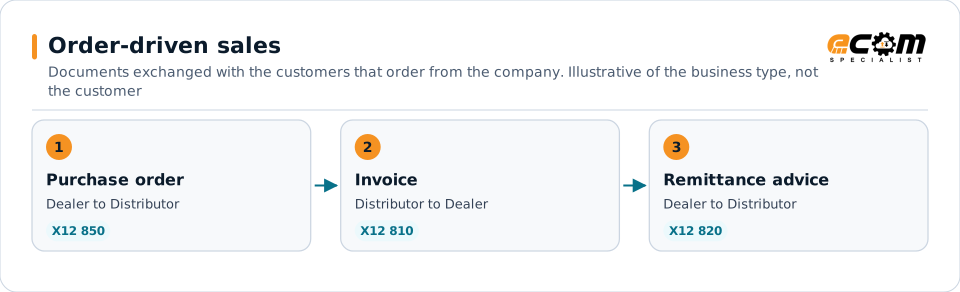
Order-driven sales
Documents exchanged with the customers that order from the company.
-
1. Order
Purchase orderX12 850
Dealer Distributor
Dealers order by EDI or in a browser.
A partner without an EDI system can send or receive this document through PRISM-WebEDI in a browser.
-
2. Dealer invoice
InvoiceX12 810
Distributor Dealer
Dealer invoices are matched to the dealers’ orders.
-
3. Get paid
Remittance adviceX12 820
Dealer Distributor
Dealer payments are matched to the right orders.
PRISM Reconcile360 matches this remittance advice with the bank deposit and the open invoices, and flags differences for review.
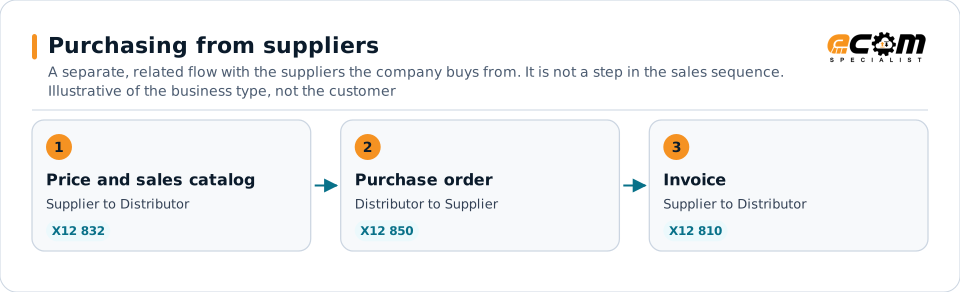
Purchasing from suppliers
A separate, related flow with the suppliers the company buys from. It is not a step in the sales sequence.
-
1. Supplier data
Price and sales catalogX12 832
Supplier Distributor
Products and prices reach the ordering systems.
ECOM operates the EDI exchange with the customer’s trading partners.
-
2. Replenish
Purchase order to supplierX12 850
Distributor Supplier
Replenishment orders go to suppliers.
Where a partner or internal system sends or receives this document by API instead of EDI, PRISM-API Gateway carries the same data.
-
3. Supplier invoice
InvoiceX12 810
Supplier Distributor
Supplier invoices are matched to the orders placed with them.
ECOM’s role
Operational needs and ECOM’s role
What this kind of exchange needs, and what ECOM does about it within the agreed scope.
Exception handling
When something goes wrong
-
Supplier data is wrong
A price or availability update is late or inconsistent.
The team that operates the exchange works it with the supplier.
-
A payment is unmatched
A dealer payment does not match orders.
It goes to review.
Business value
Confirmed scope and intended benefits
Confirmed
- ECOM operates EDI and provides the API Gateway, WebEDI and Reconcile360.
- The customer sources from many suppliers and supplies independent dealers.
Intended benefits
- Suppliers and dealers connecting through a managed route.
- Integrations following one pattern.
- Payment matching starting from records that agree.
Systems typically involved
- Supplier systemsSend product, price and availability data and receive orders.
- Dealer browsers and systemsPlace orders and receive notices and invoices.
- Ordering, ERP and finance systemsHold products, orders and invoices.
Lessons for similar enterprises
What other organizations can take from this
Keep catalog data current
A managed route for supplier price and availability data keeps the catalog trustworthy.
Let small dealers order accurately
A browser route avoids re-keying phone and email orders.
Match both sides of the money
Dealer payments and supplier invoices both need to tie back to the order.