Executive summary
The situation and ECOM’s role
A doors and windows company sells configured, made-to-order products through dealers, distributors and builders. Its orders, ship notices, invoices and payments have to agree from entry to cash.
ECOM runs this company’s EDI, API Gateway, WebEDI, Reconcile360 and PRISM Supply Chain Visibility (PRISM-SCV) as one managed scope.
When products are configured, every order change has to reach the people who build and ship it.
Customer environment
- Industry
- Doors and windows company.
- ECOM scope
- End-to-end EDI operations, API Gateway, WebEDI, Reconcile360 and PRISM-SCV.
About this profile: the customer is not named and details are generalized. What is stated about the customer comes from ECOM; text marked “industry context” describes how this kind of business typically works. No volumes, timelines, figures, quotes or measured results are published.
The challenge
Configured products, many order routes, payments to match
Industry context: a made-to-order product carries more detail than a catalog item, so a missed change or a keying error shows up at the dock. Partners differ in size and in how they order, and once goods ship, payments have to be matched to the right invoices.
Why ECOM
One team accountable from order to payment
The company deals with one ECOM team instead of coordinating separate providers for EDI, integrations, partner access, payment matching and visibility. Which activities, such as partner onboarding or mapping changes, are included follows the agreed scope.
Industry context
Doors and windows company
Doors and windows are often built to order: sizes, glass, finishes and hardware are chosen per order, and the product reaches the customer through dealers, distributors and builders.
Configuration travels with the order
Sizes and options have to arrive intact, and a change after the order is placed can affect what is built.
Partners order in different ways
Larger partners send EDI. Smaller dealers often order by browser, phone or email.
Payments arrive apart from the paperwork
Remittance information, deposits and open invoices have to be matched before an order is closed.
Where it goes wrong
Typical problems in this kind of exchange
-
Order detail is lost between systems
Configured orders carry more fields than catalog orders, and each hand-off is a chance to drop one.
A wrong size or option is found at the dock, not at order entry.
-
Late changes do not reach the plant
Changes arrive by a different route from the original order, or after the order was acknowledged.
Production works from an out-of-date order.
-
Some partners cannot send EDI
Smaller dealers have no EDI system and order by phone or email.
Staff re-key their orders, which adds delay and keying errors.
-
Payments do not match invoices
Remittance, deposits and open invoices arrive separately.
Finance matches by hand, and differences are found late.
What ECOM provides
The confirmed scope of services
-
EDI operations
ECOM runs the EDI exchange with the customer’s trading partners.
About EDI operations -
API Gateway
PRISM-API Gateway carries the integrations between the customer’s own applications and with outside parties, so internal and external connections follow one pattern.
About API Gateway -
WebEDI
PRISM-WebEDI lets trading partners without an EDI system exchange transactions through a browser.
About WebEDI -
Reconcile360
PRISM Reconcile360 matches remittance advice, bank deposits and open invoices, and flags differences for review.
About Reconcile360 -
PRISM-SCV
PRISM-SCV links an order’s documents into one timeline, monitors expected responses and routes exceptions to the right team.
About PRISM-SCV
Architecture
Where the integration sits
Company environment
- Company applications
- Shipping
- Finance
ECOM responsibilities
- End-to-end EDI
- API Gateway
- WebEDI
- Reconcile360
- PRISM-SCV
Trading partners
- Partners that exchange EDI
- Partners that use a browser
Educational diagram of this kind of environment, not the customer’s own architecture.
Running a similar exchange? Tell us your partners, systems and where the delays are, and a specialist will suggest where to start.
Talk to an EDI/API ExpertThe workflow
How the work flows
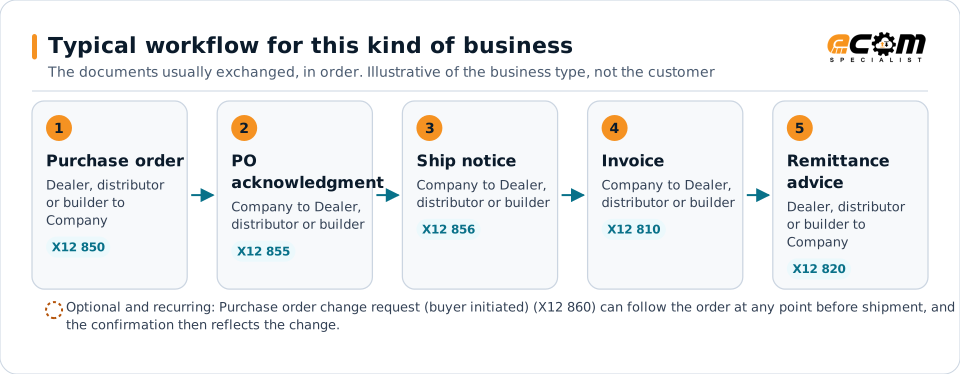
The documents typically exchanged in this kind of business, in the order they usually move. Partners vary, and some connect by API instead of EDI. The shaded line under a step shows where ECOM’s services act.
Steps are listed in the order the documents usually move, with who sends each one. Running alongside every step: Browser route, API connections, PRISM-SCV.
-
1. Order
Purchase orderX12 850
Dealer, distributor or builder Company
The partner places an order with its sizes and options.
ECOM operates the EDI exchange with the customer’s trading partners.
-
2. Confirm
Purchase order acknowledgmentX12 855
Company Dealer, distributor or builder
The company confirms what it will build and ship, or flags differences.
-
Change (optional branch, can recur)
Purchase order change request (buyer initiated)X12 860
Dealer, distributor or builder Company
When an open order changes, the change has to reach the people who build and ship it. Changes are optional and can recur.
-
3. Ship
Ship notice (advance ship notice)X12 856
Company Dealer, distributor or builder
Tells the partner what is on the truck so receiving can plan.
-
4. Bill
InvoiceX12 810
Company Dealer, distributor or builder
Bills the shipped order against the partner’s purchase order.
-
5. Remittance
Remittance adviceX12 820
Dealer, distributor or builder Company
X12 820, Payment Order/Remittance Advice, carries the remittance information. The payment itself moves through the bank and arrives as a separate deposit.
PRISM Reconcile360 matches this remittance advice with the bank deposit and the open invoices, and flags differences for review.
Running alongside every step
These support the exchange throughout. They are alternative routes and controls, not steps that happen after payment.
-
Partners without EDI
Browser route
Dealers and builders without EDI Company
An alternative way to take part in the order steps above, not an extra transaction.
A partner without an EDI system can send or receive this document through PRISM-WebEDI in a browser.
-
Integrations
API connections
Company systems Each other and outside parties
Internal and external applications connect under one pattern throughout the process.
PRISM-API Gateway carries the integrations between the customer’s own applications and with outside parties, so internal and external connections follow one pattern.
-
Visibility
PRISM-SCV
Each document, as it is sent Operations and customer service
Links an order’s documents into one timeline throughout the process.
PRISM-SCV links an order’s documents into one timeline, monitors expected responses and routes exceptions to the right team.
ECOM’s role
Operational needs and ECOM’s role
What this kind of exchange needs, and what ECOM does about it within the agreed scope.
Exception handling
When something goes wrong
-
An expected document does not arrive
An acknowledgment, ship notice or other expected document is late or missing.
PRISM-SCV monitors expected responses and routes the exception to the right team.
-
A document is rejected
A partner’s system rejects an acknowledgment, ship notice or invoice.
The ECOM team that operates the exchange sees the rejection and works it with that partner’s requirements.
-
A payment does not match
Remittance and deposit disagree with the open invoices.
The difference goes to review instead of being absorbed.
Business value
Confirmed scope and intended benefits
Confirmed
- The customer is a doors and windows company, and ECOM provides the scope above.
Intended benefits
- Partners, including those without EDI, connect through a managed route.
- Integrations follow one pattern, so a new connection does not start from scratch.
- Late or missing documents are noticed and routed, not found when a partner asks.
- Finance reviews flagged differences instead of matching every payment.
Systems typically involved
- Partner systems and browsersSend orders and receive confirmations, ship notices and invoices.
- Order, production and shipping systemsReceive orders and changes and hold the status of each order.
- Finance systemsHold invoices and receive matched payments.
Lessons for similar enterprises
What other organizations can take from this
Carry configuration through the documents
Made-to-order products need order detail and changes to arrive intact.
Give every partner a route
A browser route avoids re-keying phone and email orders.
Follow the order to the payment
PRISM-SCV and payment matching close the loop between shipping and finance.