
X12 transaction guide · Warehousing
EDI 527 Material Due-In and Receipt
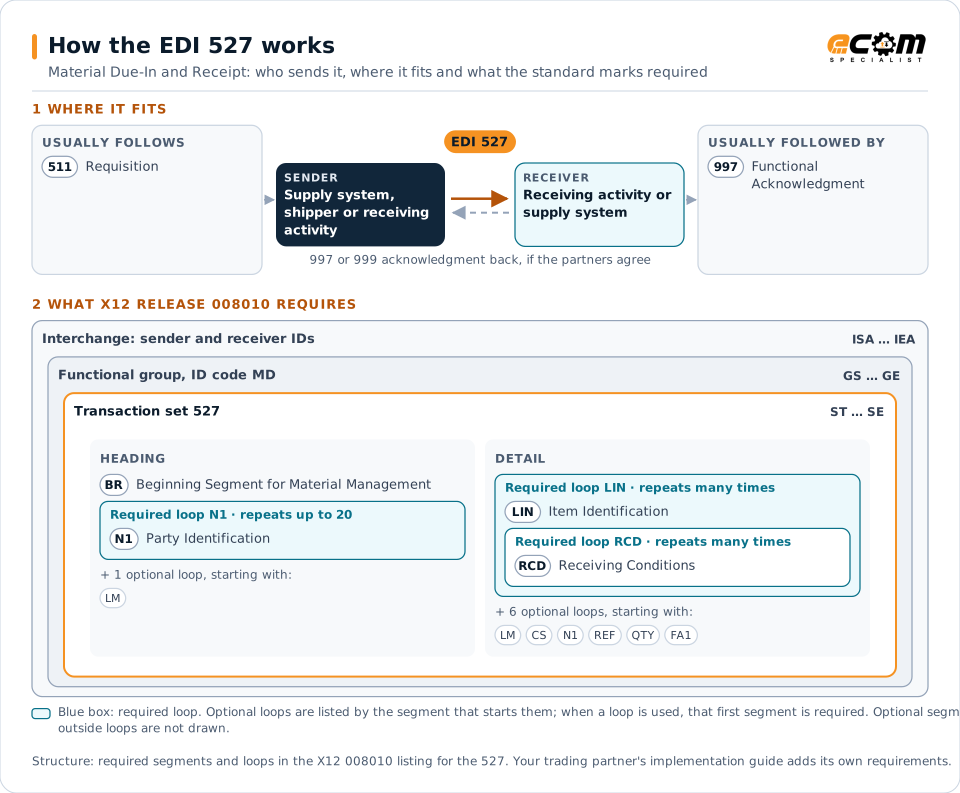
The X12 document used to give advance notice of scheduled material receipts, to report receipts, and to inquire about receipt reporting.
- Sent by
- Supply system, shipper or receiving activity
- Received by
- Receiving activity or supply system
- Standard
- ANSI ASC X12
What is an EDI 527?
The EDI 527 Material Due-In and Receipt is the ANSI X12 transaction set used to provide advance notification of scheduled material receipts, to report receipts, and to inquire about the status of receipt reporting.
In large supply systems, depots and warehouses need to know what material is due in so they can plan receiving, and the supply system needs receipt reports to update inventory and close orders. The 527 covers both sides of that exchange. Receipts update the supply system's inventory.
How to read this diagram: the top row shows who sends the 527, to whom, and which documents usually come before and after it. The lower part shows what X12 release 008010 itself requires: the envelopes around the 527 and the segments and loops the standard marks as required, area by area. Optional loops are listed by the segment that starts them rather than drawn in full. This is the standard's minimum, not a trading partner's requirement: each partner's implementation guide usually makes some optional loops mandatory, restricts the codes and may use a different release.
When it is used
- Notifying a depot of material due in
- Reporting material received
- Following up missing receipt reports
Where it fits in the document flow
Structure
Mandatory segments in the 527 (X12 release 008010)
The segments X12 release 008010 marks as mandatory at their level, in order. Segments inside optional loops are needed only when the loop is used. This is the standard's requirement, not your trading partner's: each partner's implementation guide names the release it uses, adds the optional segments it requires and restricts the values. The requirement status comes from one published X12 reference listing and has not been checked against a second source.
- ST
- BR
- LM
- LQ
- N1
- LIN
- RCD
- CS
- REF
- QTY
- FA1
- FA2
- SE
Practical example
The 527 in practice
A supply system orders replenishment stock for a depot from a vendor. It sends the depot a 527 due-in notice with the items, quantities and expected delivery date. When the material arrives, the depot reports the receipt with a 527, and the supply system updates the depot's inventory.
Implementation
Implementation considerations for the 527
- Send due-in notices early enough to plan receiving.
- Report receipts promptly and accurately.
- Follow up due-ins with no receipt report.
- Reconcile receipts with orders and invoices.
How ECOM helps
Automate the 527 with ECOM
Solution
Logistics Automation
Automate tenders, status updates, freight invoices and warehouse orders with logistics partners.
Solution
Supply Chain Visibility
Track orders, shipments and invoices across partners and catch exceptions early.
Industry
3PL and Warehousing
Warehouse orders, shipping advice, receipts and inventory reporting between brands, 3PLs, carriers and retailers.
More general questions about EDI are answered in the EDI FAQ.
Related transactions
Related warehousing documents
Need help with the EDI 527?
ECOM maps, tests and monitors X12 documents for your trading partners and integrates them with your ERP.