
X12 transaction guide · Warehousing
EDI 940 Warehouse Shipping Order
The X12 document a brand or depositor sends to a third-party warehouse instructing it to ship an order.
- Sent by
- Depositor (brand, seller or manufacturer)
- Received by
- Third-party warehouse (3PL)
- Standard
- ANSI ASC X12
What is an EDI 940?
The EDI 940 Warehouse Shipping Order is the ANSI X12 transaction set a depositor, the company that owns the inventory, sends to a third-party warehouse to request that goods be shipped. It contains the order and purchase order references, the ship-to party and address, shipping instructions such as carrier and payment terms, and the items and quantities to pick.
The 940 lets a brand run its order management in its own ERP or commerce system while a 3PL performs the physical fulfillment. The warehouse confirms what actually shipped with a 945 warehouse shipping advice, and the brand uses that confirmation to invoice its customer and update inventory.
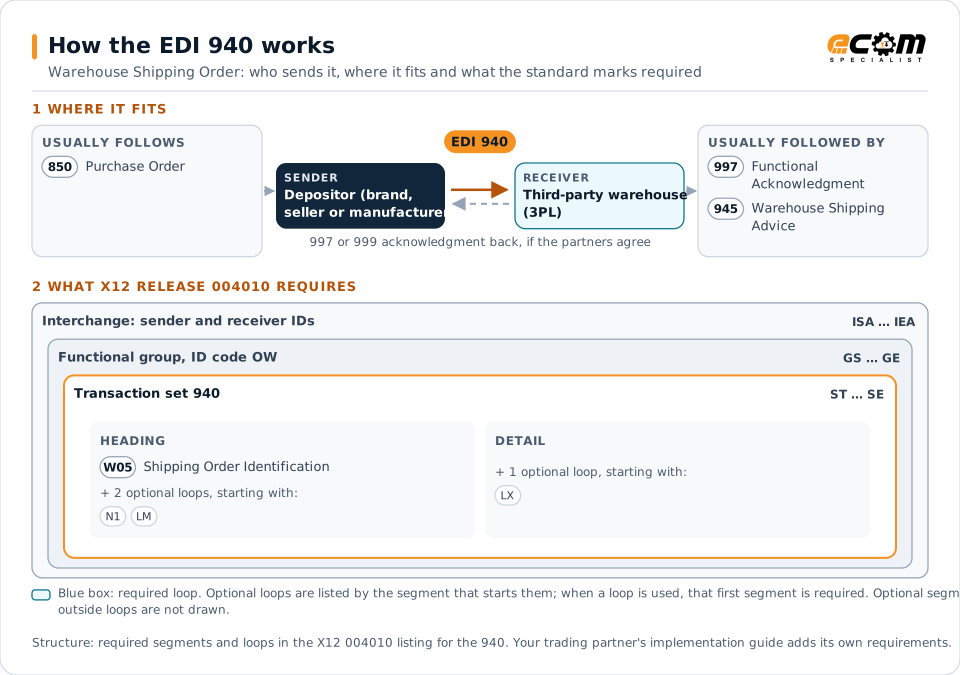
How to read this diagram: the top row shows who sends the 940, to whom, and which documents usually come before and after it. The lower part shows what X12 release 004010 itself requires: the envelopes around the 940 and the segments and loops the standard marks as required, area by area. Optional loops are listed by the segment that starts them rather than drawn in full. This is the standard's minimum, not a trading partner's requirement: each partner's implementation guide usually makes some optional loops mandatory, restricts the codes and may use a different release.
When it is used
- Brands sending customer or retailer orders to a 3PL for fulfillment
- E-commerce sellers routing online orders to outsourced warehouses
- Manufacturers shipping from public or contract warehouses
Where it fits in the document flow
Structure
Key segments in the 940
The segments most implementations use, described in plain language. The last column shows what X12 release 004010 itself requires: "Required" marks a segment the standard requires in every 940; "Optional, common" marks a segment the standard leaves optional, or that sits in an optional loop, but that implementations often use. This is the standard's requirement, not your trading partner's: each partner's implementation guide names the release it uses, makes some optional segments mandatory and restricts the values, and requirements can differ between releases. The requirement status comes from one published X12 reference listing and has not been checked against a second source.
| Segment | Name | What it carries | In X12 004010 |
|---|---|---|---|
| W05 | Shipping Order Identification | Order status code, depositor order number and purchase order number. | Required |
| N1 loop | Party Identification | Ship-to and other parties, with N3 and N4 address segments. | Optional, common |
| G62 | Date/Time | Requested ship or delivery dates. | Optional, common |
| W66 | Warehouse Carrier Information | Shipment payment method, transportation method and carrier. | Optional, common |
| LX / W01 | Line Item Detail | Each item to ship with quantity, unit of measure and product identifiers. | Optional, common |
| W76 | Total Shipping Order | Total quantity ordered, as a control total. Optional in X12 releases 003040, 004010 and 005010, but many trading partner implementation guides require it. | Optional, common |
Example
Sample EDI 940
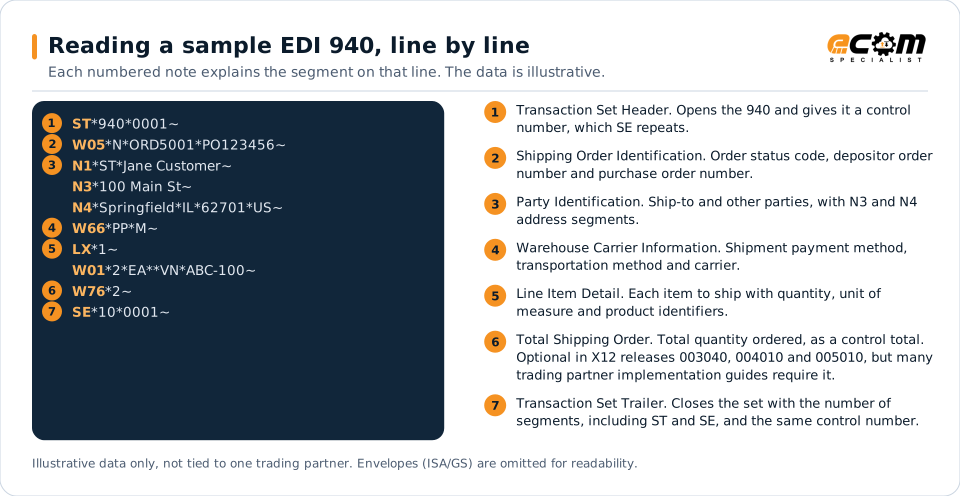
The depositor asks the 3PL to ship order ORD5001 to a consumer, prepaid by motor carrier. One line requests 2 units of item ABC-100, and W76 confirms the total.
Illustrative data only, not tied to one X12 release or trading partner. The interchange (ISA/IEA) and functional group (GS/GE) envelopes are omitted for readability.
ST*940*0001~
W05*N*ORD5001*PO123456~
N1*ST*Jane Customer~
N3*100 Main St~
N4*Springfield*IL*62701*US~
W66*PP*M~
LX*1~
W01*2*EA**VN*ABC-100~
W76*2~
SE*10*0001~The sample is the same one shown above, with a note beside each segment the first time it appears. Segment IDs are highlighted at the start of each line; the fields after them are separated by asterisks, and each segment ends with a tilde.
Avoid problems
Common 940 errors and how to prevent them
Item numbers unknown to the warehouse
The 3PL's warehouse system must recognize the depositor's item identifiers. Keep item masters synchronized.
Incomplete addresses
Consumer orders with incomplete addresses fail carrier validation. Validate addresses before sending.
Unconfirmed orders
Every 940 should eventually receive a 945. Monitor for orders without a shipping confirmation.
Trading partners
Integration guides that include the 940


How ECOM helps
Automate the 940 with ECOM
Solution
Logistics Automation
Automate tenders, status updates, freight invoices and warehouse orders with logistics partners.
Industry
3PL and Warehousing
Warehouse orders, shipping advice, receipts and inventory reporting between brands, 3PLs, carriers and retailers.
Solution
eCommerce Integration
Connect online stores and marketplaces to your ERP, warehouse and EDI processes.
EDI 940 FAQs
What is the difference between an 850 and a 940?
An 850 is a purchase order between buyer and seller. A 940 is an instruction from the inventory owner to its warehouse to ship an order.
What is the response to a 940?
The warehouse sends a 945 warehouse shipping advice confirming what shipped, usually after a 997 acknowledgment.
Which other documents do 3PLs use?
Common warehousing documents include the 943 and 944 for inbound stock transfers and receipts, and the 846 and 947 for inventory status and adjustments.
More general questions about EDI are answered in the EDI FAQ.
Related transactions
Related warehousing documents
Need help with the EDI 940?
ECOM maps, tests and monitors X12 documents for your trading partners and integrates them with your ERP.