
PRISM-WebEDI · Manufacturers
WebEDI for manufacturers and brands selling to retailers
Winning a retail account creates work well beyond receiving a purchase order. PRISM-WebEDI gives your team a browser workspace to review retailer orders in readable forms and create the acknowledgment, shipment documents, ASN and invoice, without constructing EDI files. ECOM configures the agreed documents, validation rules and connections.
Who it serves
Built for manufacturers working with retailers programs
Manufacturers entering retail
Start trading electronically with a retailer without first building an internal EDI operation.
Suppliers adding accounts
Make each new retailer requirement more repeatable.
Brands that outsource fulfillment to a 3PL
Coordinate order, shipment and invoice data across your warehouse partner.
Businesses planning ERP integration
Start with a portal now and move selected workflows to direct system exchange later, in a hybrid model.
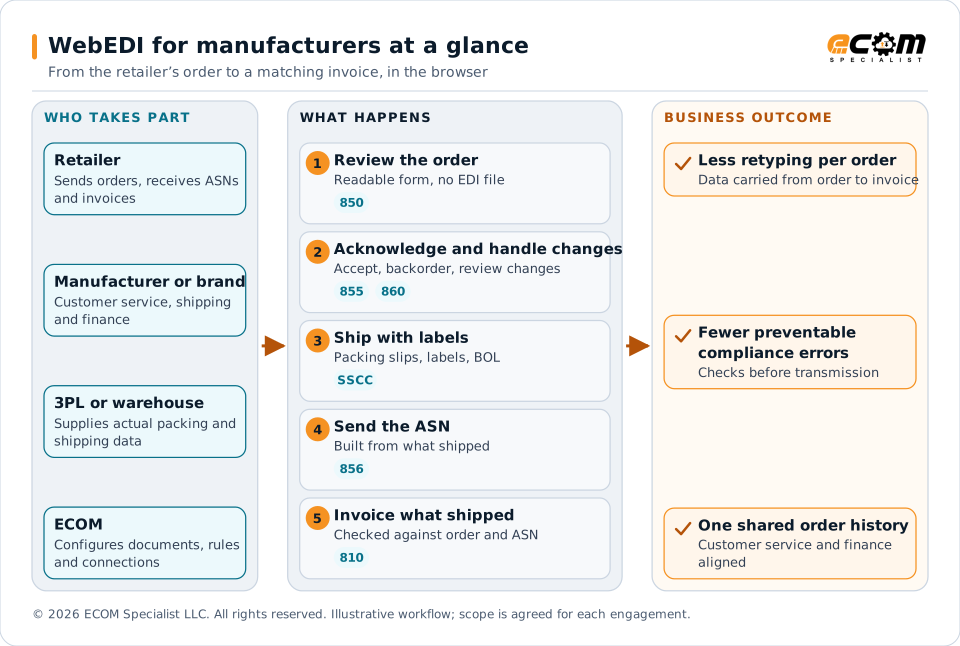
The retailer, the manufacturer (customer service, shipping and finance) and, where used, a 3PL work through linked steps in PRISM-WebEDI: review the order, acknowledge and handle changes, ship with labels, send the ASN built from what shipped, and invoice. ECOM configures the documents, rules and connections. The business outcome is less retyping per order, fewer preventable compliance errors and one shared order history.
Challenges
What goes wrong without a tested, connected process
Different rules for every retailer
Each retailer has its own documents, identifiers, packaging rules and deadlines.
Repeated data entry
Purchase order numbers, customer item numbers, destinations and line details are retyped from order to ASN to invoice.
Label and ASN errors
A correctly formatted message cannot compensate for a label attached to the wrong carton.
Late order changes
A later order version can change quantities, dates or destinations after planning has begun.
Invoices that do not match what shipped
Partial shipments, split invoices, pricing and allowances need defined rules to avoid rejections.
Workflows and documents
The workflow and the documents behind it
The order remains the reference point for every response. Carrying forward order information reduces repeated entry, and your staff supply what changes during execution: accepted quantities, ship dates, carton contents and carrier references.
| Step | What the team does in the browser | Typical X12 document |
|---|---|---|
| Receive the order | Review the retailer order in a readable form, including ship-to locations, dates, item identifiers, allowances and routing | 850 |
| Acknowledge | Accept, reject, backorder or propose changes where the retailer permits | 855 |
| Handle changes | Review changed information before releasing another shipment | 860, 865 |
| Ship | Prepare packing slips, labels, pick and pack documents and bills of lading from operational data | Shipping documents |
| Send the ASN | Build the ship notice from what actually shipped, with the required packaging hierarchy | 856 |
| Invoice | Invoice against the correct order and shipment, with agreed fields checked first | 810 |
Capabilities
What your team can do in PRISM-WebEDI
Open any item for the detail.
Keep the order and its responses connectedThe order stays the reference for the acknowledgment, shipment notice and invoice.
- Carrying forward order information reduces repeated entry of purchase order numbers, customer item numbers, destinations and line details.
- The workflow makes the next action clear: acknowledge the order, resolve a discrepancy, prepare a shipment, complete missing packaging data or submit the invoice.
- Document linking gives customer service and finance a shared history instead of separate email trails.
- An incoming change is highlighted and routed for review before staff release another shipment. If a shipment has already left, the workflow preserves that fact and escalates the conflict rather than silently overwriting execution history.
Manage order acceptance and exceptionsForms show what each role needs and keep the partner references for later documents.
- Retailer purchase orders can carry multiple ship-to locations, requested delivery dates, item identifiers, allowances and routing instructions.
- Acknowledgment workflows can capture acceptance, rejection, backorders and proposed changes where the retailer permits them.
- Distinguish a missing item cross-reference (a data correction) from a genuine inventory shortage (a commercial decision and a response to the buyer).
- Configuration options include customer item cross-references, units of measure, case-pack relationships, ship-from locations, approved substitutions and reason codes.
- Validation identifies missing or inconsistent information before transmission, with actionable messages.
Prepare shipments and shipping documentsOrders, shipped quantities, cartons, pallets and transport references stay related.
- Supports partial shipments, orders filled from more than one location and multiple orders on one shipment, where the retailer’s rules allow.
- Prepare the agreed packing slips, pick and pack documents, shipping labels and bills of lading from operational data.
- Where a 3PL performs fulfillment, ECOM can scope a portal handoff or system integration, so warehouse staff supply actual packing and shipping data.
- Label compliance depends on the retailer’s current specification, the item and packaging data and the physical label printed and applied. The project tests the printed output as well as the electronic file.
Build the ASN from what actually shippedThe ship notice is linked to shipped quantities and the required packaging hierarchy.
- Depending on the partner, the ASN can include shipment, order, pallet, carton and item detail.
- Where required, the ASN and shipping labels reference the same Serial Shipping Container Codes (SSCCs). A GTIN identifies a trade item; an SSCC identifies a logistics unit such as a carton or pallet.
- The workflow checks required references, packaging relationships and the transmission deadline before release.
- Changes after labeling or ASN submission follow controlled handling, including any permitted replacement or cancellation process.
- These controls help reduce preventable receiving errors and compliance deductions. They do not guarantee a retailer will never assess a chargeback.
Invoice against the correct commercial eventA linked invoice workflow uses the related order and shipment data.
- Agreed fields such as invoice number, purchase order reference, shipped quantities, pricing and permitted charges are checked before sending.
- Define how partial shipments, split invoices, tax, freight, discounts, credits and retailer-specific allowances are handled. These are commercial rules, not just file-format decisions.
- Where finance uses an ERP, the integration design determines which application creates the financial invoice and which transmits it, preventing duplicate posting.
- A transmitted invoice and an invoice accepted for payment are different states. The view distinguishes delivery, technical acknowledgment, business rejection and payment-related information when the retailer provides them.
Give each team the information it needsScoped dashboards and alerts focus on work that needs action.
- Customer service sees open orders and unanswered requests; shipping sees quantities, destinations, packaging and deadlines; finance sees invoice status and disputed amounts; managers see overdue work and recurring exceptions by trading partner.
- Views can be organized by retailer, order, fulfillment location and responsible team.
- Alerts cover an order awaiting response, a shipment missing carton data, an ASN approaching its deadline or a rejected invoice.
- Recipients and escalation rules match the customer’s operating hours and ownership structure.
In practice
Manufacturer example
A 500-case order across two distribution centersOne order, two destinations, one partial shipment.
- A brand receives a retailer order for 500 cases across two distribution centers. Customer service reviews the order and responds using the retailer’s permitted acknowledgment process. One destination can receive the full quantity; the other requires a partial shipment.
- The warehouse records the actual carton and pallet structure, and the agreed labels and packing documents are produced from it.
- Each shipment produces its own ASN, and finance creates invoices consistent with the agreed shipment and billing rules.
- Customer service can trace each response to the original order and see the outstanding balance without assembling spreadsheets.
- This is an illustrative process. Document choices, shipment grouping and invoice rules are established separately for each retailer relationship.
Business benefits
What this means for the business
Less administrative work per order
Linked documents and carried-forward data reduce retyping and email follow-up.
Visibility into uncompleted tasks
See which orders, shipments and invoices need action, and who owns them.
Repeatable retailer onboarding
Document sets, rules and workflows can be reused as you add retail accounts.
Room to grow
Start in the browser, then connect your ERP or fulfillment system for selected workflows.
Measure the value against your own baseline
Value should be measured against your actual starting point, not assumed percentage savings. Review results by retailer so a demanding account is not hidden by an overall average.
- Minutes of manual entry per order
- Acknowledgment turnaround
- ASN timeliness
- First-pass document acceptance
- Invoice rejection rate
- Compliance deductions attributable to data or document errors
Getting started
Start with a live retail workflow
Bring one retailer requirement guide, a sample order, an example shipment, your shipping label requirements and your current ERP or fulfillment process. ECOM uses them to demonstrate the order-to-invoice workflow and define the portal and integration scope.
Frequently asked questions
What is WebEDI for manufacturers?
It is a browser-based workspace for exchanging structured business documents with retailers. Your team reviews orders in readable forms and creates the acknowledgment, shipment documents, ASN and invoice without constructing EDI files, while ECOM manages the agreed translation and connections.
Do we need an EDI system or ERP integration to start?
No. The portal can be used on its own, in a hybrid model with selected system interfaces, or integrated with your ERP or fulfillment system. The right mix depends on volume, source data and ownership of errors.
Does WebEDI create compliant shipping labels?
Label and ASN content can be prepared from your shipment data. Compliance depends on the retailer’s current specification, your item and packaging data and the physical label that is printed and applied, so the project tests the printed output as well as the electronic file.
Will this prevent chargebacks?
Controls help reduce preventable receiving errors and compliance deductions, but they do not guarantee a retailer will never assess a chargeback.
Can a 3PL be part of the workflow?
Yes. Where a 3PL performs fulfillment, ECOM can scope a portal handoff or system integration so warehouse staff supply actual packing and shipping information.
WebEDI by Industry
Other industries
-
Retailers working with manufacturers
A supplier portal for orders, acknowledgments, ship notices and invoices, built around your rules.
View retailers working with manufacturers -
3PLs and warehousing providers
Receipts, outbound orders, ASNs, labels, inventory and exceptions across customers, retailers and carriers.
View 3pls and warehousing providers -
Trucking companies
Load tenders, responses, status events, delivery evidence and freight invoices in one browser workspace.
View trucking companies
Talk to an EDI/API Expert about manufacturers working with retailers
Tell us about your partners, systems and goals. We will outline the scope, the workflow and what you would need to bring.