
PRISM-WebEDI · Trucking
WebEDI for trucking companies: from load tender to freight invoice
A carrier may need to receive electronic load offers, respond quickly, report shipment events and submit freight invoices to keep a shipper account. PRISM-WebEDI is the carrier’s browser workspace for those exchanges. ECOM handles the agreed translation and connectivity while your dispatch and billing staff review loads and enter permitted responses.
Who it serves
Built for trucking companies programs
Carriers entering EDI relationships
Meet a shipper’s electronic requirements without building an internal EDI operation.
Regional fleets serving several shippers
Handle each customer’s references, events and invoice rules in one workspace.
Operations with a TMS
Add selected interfaces and a portal around the TMS, without a second conflicting dispatch record.
Carriers with lower-volume accounts
Use the portal for accounts where direct integration is not yet justified.
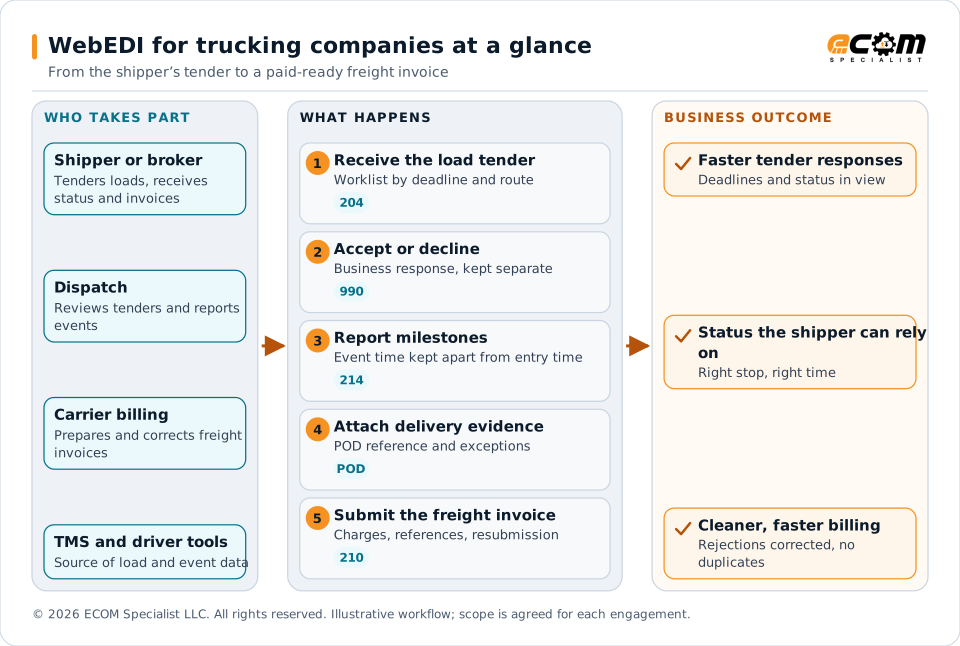
The shipper or broker, dispatch, carrier billing and the TMS and driver tools work through linked steps in PRISM-WebEDI: receive the load tender, accept or decline, report milestones, attach delivery evidence and submit the freight invoice. The business outcome is faster tender responses, shipment status the shipper can rely on, and cleaner, faster billing.
Challenges
What goes wrong without a tested, connected process
Tender response deadlines
Loads need a fast, correct acceptance or decline, and a technical acknowledgment does not mean the carrier accepted the load.
Inconsistent references
A load can carry shipper, carrier, bill of lading, pickup, PRO and purchase order references that must match the shipper’s records.
Status events with the wrong time
When an event occurred differs from when it was entered or transmitted; time zones and reason codes must be explicit.
Delivery evidence and exceptions
Proof of delivery, damage, shortage, refusal, missed appointments and detention need the shipper’s agreed reporting process.
Rejected or duplicate invoices
A customer may accept a file technically and reject its business content later. Reprocessing must avoid duplicate freight bills.
Workflows and documents
The workflow and the documents behind it
The TMS or dispatch application remains the operational source where one is used. WebEDI provides the agreed portal and transaction exchange around it. Dispatch, optimization, driver compliance, electronic logging and fleet maintenance are separate systems unless explicitly included.
| Step | What dispatch or billing does | Typical X12 document |
|---|---|---|
| Receive the tender | Review loads by customer, deadline, pickup date, origin, destination and status | 204 |
| Respond | Send the shipper’s permitted acceptance or rejection | 990 |
| Report status | Provide pickup, departure, arrival, in-transit, delivery and exception events | 214 |
| Show delivery evidence | Associate proof of delivery and exception information with the shipment | POD reference |
| Bill | Review linehaul and authorized accessorials, then submit the freight invoice | 210 |
| Follow acknowledgments | See sent, acknowledged, rejected or awaiting response, and fix rejections | 997, 999 |
Capabilities
What the carrier workspace covers
Open any item for the detail.
Review and respond to load tendersA worklist organized by customer, deadline, pickup date, route and status.
- Dispatchers review shipment details and provide the shipper’s permitted acceptance or rejection response.
- The business response is shown separately from the technical acknowledgment, with the relevant timestamps preserved.
- Changed or canceled tenders get controlled handling. A change after driver assignment needs a different response from a change before acceptance, and the load’s version and decision history is kept.
Consistent shipment referencesCross-references that match what the shipper recognizes.
- A load may carry a shipper reference, carrier reference, bill of lading, pickup number, PRO number, purchase order reference and customer-specific identifiers.
- For multi-stop shipments, the configuration distinguishes the stop, location, appointment or window and the applicable event.
- Event sequence and reference rules are confirmed with each shipper rather than assumed identical across accounts.
Meaningful transportation eventsPickup, departure, arrival, in-transit, delivery and exception events with reliable time.
- Each event needs a shipment or stop reference and a reliable event time. The configuration separates when an event occurred from when it was entered or transmitted, and defines time zones and permitted reason codes.
- If a carrier relies on staff entry, the shipper’s view reflects that process.
- Continuous location visibility, geofencing and automatic status generation require separate TMS, telematics, mobile or visibility integrations. A browser portal alone does not establish live vehicle tracking.
Delivery evidence and exceptionsProof of delivery and exception data tied to the shipment.
- The workflow can associate the agreed proof of delivery reference, delivery date and time, recipient details and exception information with the shipment. Document upload, photographs, signature capture and mobile forms are options to confirm and demonstrate.
- Damage, shortage, refusal, missed appointments and detention use the shipper’s agreed reporting process. Capturing an exception does not by itself establish liability or authorize an accessorial charge.
- Offline driver operation needs an explicitly supported mobile application and synchronization design, which is tested for disconnected entry, reconnection, duplicate prevention and conflict handling.
Freight invoices with the required detailThe freight bill is linked to the load and agreed references.
- Collect the permitted charges and required supporting information before generating the customer’s electronic invoice.
- Linehaul, fuel surcharge, detention, layover, unloading and other accessorials need the customer’s approved charge codes and authorization rules. A missing proof of delivery or an unapproved accessorial can be routed for review before submission where those controls are included.
- Rate calculation, contract rating, tax, settlement, factoring, collections and accounting posting are separate functions to confirm. Transmitting a freight invoice is not a complete carrier financial system.
Acknowledgments and rejected transactionsKnow whether a transaction was sent, acknowledged, rejected or awaiting a response.
- The worklist makes rejection details visible and links corrections to the original load or invoice.
- Reprocessing uses the agreed transaction and business identifiers to avoid duplicate status events or freight bills.
- Billing can prioritize invoices blocked by missing references or supporting information. Payment status appears only when a connected financial source or the customer provides it; successful transmission does not prove payment approval.
In practice
Trucking example
A regional carrier handles a shipper’s loadTender, response, milestones, delivery evidence, invoice and correction.
- A regional carrier receives a shipper’s load tender. Dispatch reviews the pickup and delivery details and sends the permitted response.
- As the load progresses, required milestones are entered by staff or received from the agreed operational interface.
- At delivery, the carrier records the event and supplies the required supporting reference or document.
- Billing reviews the linehaul and any authorized accessorials before submitting the freight invoice. If the shipper rejects a missing reference, billing corrects it and follows the agreed resubmission process.
- The workflow connects dispatch and billing around the same load without assuming that a message acknowledgment, a delivery event and payment approval are the same outcome.
Business benefits
What this means for the business
Practical electronic participation
Meet shipper requirements without an internal EDI operation and with less repeated data entry.
Visible delays
Expose work that delays tender response or billing.
A path as volume grows
Move selected workflows to direct integration with your TMS when volume justifies it.
Dispatch and billing on the same load
One record of the load links tenders, events, evidence and invoices.
Measure carrier performance
Measure payment timing separately, using financial records.
- Tender response time
- Tender response compliance
- Required milestone reporting rate
- Event reporting delay
- First-pass freight invoice acceptance
- Time from delivery evidence to invoice submission
Getting started
Demonstrate a shipper-to-payment workflow
Bring a sample tender, the required status events, a freight invoice, the shipper’s implementation guide and details of your TMS or current dispatch process. ECOM defines which actions belong in the browser and which should come from system integration.
Frequently asked questions
What is WebEDI for trucking companies?
It is a browser workspace where dispatch and billing review load tenders, send permitted responses, report shipment events, provide delivery evidence and submit freight invoices, while ECOM manages the agreed EDI translation and connections.
Does it replace our TMS?
No. The TMS or dispatch application remains the operational source where you have one. WebEDI provides the portal and transaction exchange around it, so you do not keep two conflicting dispatch records.
Can it track vehicles live?
A browser portal alone does not provide live vehicle tracking. Continuous location, geofencing and automatic status generation need separate TMS, telematics, mobile or visibility integrations.
Does it calculate freight rates or settle payments?
No, rate calculation, contract rating, settlement, factoring, collections and accounting posting are separate functions to confirm. Transmitting a freight invoice is not a complete carrier financial system.
Which documents are involved?
Typically X12 204 load tender, 990 response, 214 shipment status and 210 freight invoice, with 997 or 999 technical acknowledgments. Your shipper’s guide governs the actual exchange.
WebEDI by Industry
Other industries
-
Manufacturers working with retailers
Order, acknowledgment, labels, ASN and invoice in one linked browser workflow for retail accounts.
View manufacturers working with retailers -
Retailers working with manufacturers
A supplier portal for orders, acknowledgments, ship notices and invoices, built around your rules.
View retailers working with manufacturers -
3PLs and warehousing providers
Receipts, outbound orders, ASNs, labels, inventory and exceptions across customers, retailers and carriers.
View 3pls and warehousing providers
Talk to an EDI/API Expert about trucking companies
Tell us about your partners, systems and goals. We will outline the scope, the workflow and what you would need to bring.