
PRISM-WebEDI · Retailers
WebEDI for retailers: bring every supplier into electronic trading
A retailer may have reliable EDI with its largest manufacturers while smaller suppliers still answer through email, spreadsheets or paper. PRISM-WebEDI gives those suppliers a browser workspace. You keep your agreed electronic process; they receive readable documents and complete structured responses.
Who it serves
Built for retailers working with manufacturers programs
Regional manufacturers
Participate electronically without first building an internal EDI operation.
Specialty brands
Respond to orders, ship with compliant data and invoice through a guided workspace.
Seasonal suppliers
Get a practical route to electronic participation for periodic programs.
Retail purchasing, receiving and accounts payable
Receive structured responses, shipment information and invoice data from suppliers that were previously off-system.
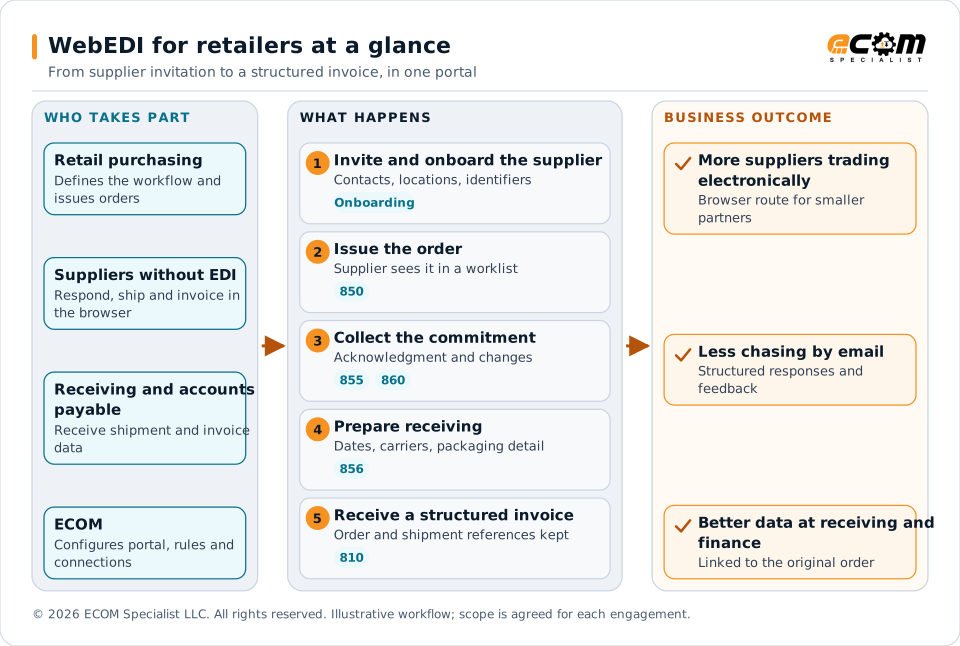
Retail purchasing, suppliers without EDI, and receiving and accounts payable work through a supplier portal that ECOM configures: onboard the supplier, issue the order, collect the commitment, prepare receiving, and receive a structured invoice. The business outcome is more suppliers trading electronically, less chasing by email, and better data at receiving and finance.
Challenges
What goes wrong without a tested, connected process
Uneven visibility
Some orders flow through established EDI while others require purchasing, distribution and accounts payable to chase information manually.
Responses that are not usable commitments
Knowing a supplier opened an email is not the same as a structured response on what can be delivered and when.
Receiving without advance information
Receiving teams need dates, carrier references, quantities and packaging detail before goods arrive.
Invoice exceptions
Missing references, duplicate submissions and inconsistent quantities create follow-up with accounts payable.
Different programs, different rules
Distribution center replenishment and drop ship need different fields, timing and operational rules.
Workflows and documents
The workflow and the documents behind it
The buying organization defines the workflow. ECOM configures the portal forms, document exchanges, rules and connections in the agreed implementation. Suppliers can move to direct integration later while keeping the retailer’s business requirements.
| Step | What the supplier does in the portal | Typical X12 document |
|---|---|---|
| See the order | Work from an order list with the retailer’s instructions | 850 |
| Commit | Respond with the acceptance and exception information the retailer permits | 855 |
| Handle changes | Re-acknowledge changes, linked to the original order | 860, 865 |
| Prepare receiving | Provide shipment dates, carrier references, quantities and packaging detail | 856 |
| Invoice | Submit a structured invoice that keeps the order and shipment references | 810 |
| Correct | See rejection feedback and fix the underlying issue | Exception feedback |
Capabilities
What the supplier workspace includes
Open any item for the detail.
A consistent supplier experienceSuppliers see what needs attention, what the retailer requires and whether a response was accepted.
- The experience includes an order worklist, relevant retailer instructions, response forms, shipment preparation, invoice submission and exception feedback.
- Permissions limit each supplier organization to its own business records and authorize individual users for the tasks they perform.
- Onboarding can gather business information, operational contacts, shipping locations and required identifiers.
- Transaction onboarding is distinct from financial vendor onboarding. Bank details, tax verification, payment authorization and supplier risk checks stay in the retailer’s approved processes unless explicitly included in scope.
Usable order commitmentsA structured acknowledgment instead of an opened email.
- A configured acknowledgment process captures the retailer’s permitted acceptance and exception information at the appropriate level.
- The workflow separates an allowed response from a requested change that needs buyer approval. A supplier’s proposed date or substitution does not become an approved commitment unless the retailer authorizes that behavior.
- Order changes stay linked to the original purchase order. The configuration defines what suppliers must re-acknowledge, how changed lines appear and how the buying team is notified when a change conflicts with work in progress.
Better receiving preparationStructured shipment information before goods arrive.
- The portal can collect shipment dates, carrier references, quantities and packaging details required by the retailer’s receiving process.
- Where required, suppliers generate labels and shipment notices using the retailer’s approved identifiers and packaging rules.
- The retailer’s warehouse or receiving application remains the source of the physical receipt. An ASN communicates an expected shipment; it does not prove goods were delivered, received in full or accepted as saleable.
Distribution center and drop ship programsPrograms are separated so suppliers see the instructions that apply.
- Distribution center shipments may emphasize appointment references, pallet and carton structure, routing instructions and compliance labels.
- Drop ship orders may emphasize individual order response, permitted shipping service, parcel tracking, cancellation windows and consumer-facing packing documents.
- Customer address information for drop ship requires controlled access and appropriate retention. The supplier receives only the data needed for fulfillment.
- Returns, marketplace updates, branded packing documents and carrier label purchasing are additional functions to confirm during scoping.
Fewer invoice exceptionsChecks before the invoice enters your financial process.
- A structured supplier invoice that keeps the original order and shipment references is easier to validate. Configured controls can identify missing references, duplicate submissions and inconsistent quantities.
- The portal distinguishes invoice submission from approval for payment. Order and receipt matching, tolerance rules, tax, payment scheduling and accounting posting belong to your financial workflow or an explicitly scoped integration.
- Where rejection or status information is available, suppliers get clearer feedback, which reduces repeated calls to accounts payable.
Supplier performance with usable contextDashboards and scorecards use agreed definitions.
- The dashboard can organize open acknowledgments, overdue shipment notices, document rejections and unresolved supplier tasks.
- On-time delivery needs dependable receipt or delivery evidence; it cannot be inferred from the time an ASN was submitted. Fill rate needs an agreed basis for ordered, canceled, shipped and received quantities. Document compliance is measured separately from physical fulfillment.
- Where connected systems provide the data, ECOM can scope supplier scorecards and actionable visibility. Missing data appears as unavailable rather than as successful performance.
In practice
Retailer example
Adding a regional manufacturer with no EDI systemInvite, test, approve, then go live.
- The supplier is invited into the portal and completes the agreed onboarding information. A test purchase order is issued, followed by an acknowledgment, a sample shipment notice and an invoice.
- After the retailer approves the workflow, live orders are made available to authorized supplier staff.
- Purchasing sees unanswered orders, the distribution center receives the agreed shipment information through its existing system, and accounts payable receives structured invoice data.
- A buyer resolves commercial changes while ECOM handles the agreed transaction connections and technical support responsibilities.
Business benefits
What this means for the business
More suppliers participating electronically
A browser route for suppliers that cannot or do not need to build EDI.
Less follow-up work
Structured responses replace emails and spreadsheets.
More complete information at receiving and finance
Shipment and invoice data arrives structured and linked to the order.
A path to full integration
Suppliers can move to direct integration later while keeping your requirements.
Measure supplier enablement
Segment results by supplier type and transaction volume to see where portal adoption helps most.
- Supplier activation rate
- Time from invitation to first successful transaction
- Acknowledgment compliance
- ASN completeness
- Invoice first-pass acceptance
- Supplier-related manual touches per order
Getting started
Launch a supplier enablement program
Bring your supplier segments, required documents, purchasing and receiving workflows and a representative set of supplier exceptions. ECOM defines a pilot cohort and a repeatable onboarding process with clear responsibilities for your team, your suppliers and ECOM.
Frequently asked questions
What is a WebEDI supplier portal?
It is a browser workspace where suppliers see orders, complete structured responses, prepare shipment information and submit invoices. The retailer keeps its agreed electronic process, and ECOM configures the forms, rules and connections.
Which suppliers is it best for?
It suits regional manufacturers, specialty brands, seasonal suppliers and other partners that need electronic participation without first building an internal EDI operation.
Does the portal handle vendor financial onboarding?
No, not unless explicitly included in scope. Bank details, tax verification, payment authorization and supplier risk checks remain in the retailer’s approved processes.
Does an ASN prove the goods were received?
No. An ASN communicates an expected shipment. Your receiving application remains the source of the physical receipt.
Can we separate distribution center and drop ship suppliers?
Yes. The configuration separates programs so suppliers see the fields, timing and instructions relevant to the orders they are fulfilling.
WebEDI by Industry
Other industries
-
Manufacturers working with retailers
Order, acknowledgment, labels, ASN and invoice in one linked browser workflow for retail accounts.
View manufacturers working with retailers -
3PLs and warehousing providers
Receipts, outbound orders, ASNs, labels, inventory and exceptions across customers, retailers and carriers.
View 3pls and warehousing providers -
Trucking companies
Load tenders, responses, status events, delivery evidence and freight invoices in one browser workspace.
View trucking companies
Talk to an EDI/API Expert about retailers working with manufacturers
Tell us about your partners, systems and goals. We will outline the scope, the workflow and what you would need to bring.