Retail integration

Dollar General EDI integration and automation

A guide for vendors connecting with Dollar General, covering core documents, invoice rules, payment matching and ERP integration.

At a glance

Dollar General integration, in three pictures

The industry, the document flow and the outcome for your team. Illustrations only: they show typical practice, not a specific Dollar General program or a customer relationship.

Illustration of a retail storefront with an awning and a shopping bag, representing the retail industry that Dollar General operates in.
Industry. Retail: where Dollar General operates.
Workflow diagram: your ERP and warehouse systems exchange documents with Dollar General through ECOM. You send 810, 856, 855; you receive 850, 852; 997 acknowledgments go both ways. Your systems ERP · warehouse · finance ECOM integration map · validate · connect · monitor Dollar General 810 856 855 810 856 855 850 852 850 852 997 both ways
Workflow. Documents in each direction. Orange: you send. Blue: you receive. Typical, not confirmed.
Comparison diagram: without integration, documents are re-keyed, files are emailed and rejections are found late; with ECOM, documents are mapped to your ERP, validated and monitored, and exceptions are visible early. Without integration Orders re-keyed by hand Files emailed or uploaded Rejections found late With ECOM Documents mapped to your ERP Every file validated and monitored Exceptions visible early
Outcome. From manual handling to a monitored flow. No figures: results depend on your setup.

Talk to an EDI/API Expert about Dollar General

Tell us which documents you exchange with Dollar General, which ERP you run and when you need to be live. A specialist will outline the connection, mapping and testing plan. This page is a guide based on typical practice; it does not mean ECOM works with Dollar General.

  • Review of Dollar General's requirements with you, once you have them
  • EDI and API integration with your ERP and warehouse systems
  • Monitoring and managed service after go-live, if you want it

Prefer to call? Sales 972-836-7750 or email sales@ecom-specialist.com.

Takes about 30 seconds. Phone and note are optional.

Your request is about

Trading partner
Dollar General

When should we talk?

Times are in your time zone. We use this to schedule the conversation.

We use your details only to respond to your request. See our privacy notice. Prefer to talk? Call Sales at 972-836-7750.

Integration and onboarding

How Dollar General integration fits your systems

Your systemsERP, WMS and accounting
ECOMMapping, validation, connectivity and monitoringAS2 · Vendor portal
Dollar GeneralIts program, documents and requirements
  1. ConfirmConfirm your Dollar General program, role and the documents it requires.
  2. MapMap each document to your ERP fields and business rules.
  3. ConnectConfigure the connection and security the program needs.
  4. TestTest against the applicable specifications and acknowledgments.
  5. Go liveGo live with monitoring, alerts and exception handling.
Typical implementation path. Exact requirements are confirmed against the applicable specifications during onboarding.

Overview

Understanding Dollar General integration

Who this is for: Consumer goods, food and general merchandise vendors supplying Dollar General distribution centers.

Dollar General operates a large network of small-format stores supplied through distribution centers, and it relies on EDI for ordering and invoicing with vendors. Sources differ on whether ship notices and purchase order acknowledgments are required for every vendor, which suggests requirements vary by program.

Invoice discipline is a recurring theme. Sources describe Dollar General expecting an invoice for each purchase order, invoices that cover a single shipment against a single order, and payment that depends on matching the purchase order, the distribution center receipt and the invoice. Invoices that combine shipments or orders can be rejected.

Dollar General publishes vendor resources through its vendor portal. Vendors should confirm their document set, connection method and testing requirements there before going live.

Requirements at a glance

What Dollar General publishes for suppliers

Dollar General publishes vendor information on DG Partners. Its full Domestic Vendor Guide and EDI Programming Guide need a user ID and password from Dollar General. The public quick start overviews, dated 2011 and 2012, state that EDI is required, name the core documents and say vendors must follow VICS standards and Dollar General's EDI Trading Partner Agreement. Because those overviews are old, confirm every point against the current guides. We checked DG Partners on October 30, 2026.

DG Partners

Dollar General's vendor and logistics site: public quick start overviews and carrier EDI specifications; vendor guides and the EDI Programming Guide need a login.

Public landing page; some documents need a login Official site

Business units and channels

Dollar General business units suppliers trade with

Large companies often handle each business unit or channel as a separate EDI relationship, with its own documents, guides and setup. Confirm with Dollar General which of these applies to you before mapping.

Stores and distribution centers

Domestic warehouse vendors

Vendors shipping to Dollar General distribution centers, including fresh distribution centers, on EDI purchase orders and invoices.

Documents: 850,810,997

Confirmed on a public Dollar General page

Other channel

Scan based trading vendors

Vendors that own inventory until it sells, with store and DC sales reports, pricing catalog and electronic payment.

Documents: 810,820,832,852,855

Confirmed on a public Dollar General page

Stores and distribution centers

Direct store delivery vendors

Vendors delivering straight to stores, with their own DSD vendor guide behind the DG Partners login.

Named in a public Dollar General document title; contents not reviewed

International

Direct import vendors

Vendors importing directly for Dollar General, with a separate import vendor guide behind the login.

Named in a public Dollar General document title; contents not reviewed

Other channel

Carriers

Transportation providers, with public mapping guidelines for load tenders, freight invoices, manifests, status messages and remittance.

Documents: 204,210,212,214,820,990

Confirmed on a public Dollar General page

Workflows

Typical Dollar General business workflows

The steps summarize the documents below. Where a step is not in Dollar General's published documents, it reflects common practice.

Distribution center order-to-cash

  1. 1Receive 850 purchase order
  2. 2Ship to the distribution center
  3. 3Send one invoice per order
  4. 4Match receipt and invoice
  5. 5Receive payment

Documents and APIs

Dollar General documents by program

Every document this guide names, with the program it applies to and its status. Required, optional and conditional come from Dollar General's published documents cited below; documents marked general guidance are common in this industry but not confirmed for Dollar General.

DocumentNameDirectionProgramStatusPurpose
850 Purchase Order You receive from Dollar General Domestic vendors Required Dollar General orders products for its distribution centers.
810 Invoice You send to Dollar General Domestic vendors Required Bills one shipment against one purchase order.
856 Advance Ship Notice You send to Dollar General Not stated General guidance Describes shipments where the vendor's program requires it.
855 Purchase Order Acknowledgment You send to Dollar General Scan based trading vendors General guidance Confirms orders where the vendor's program requires it.
997 Functional Acknowledgment Both directions Domestic vendors Required Confirms documents were received.
852 Product Activity Data You receive from Dollar General Scan based trading Named; level not stated Scan based trading vendors get sales and inventory activity as two 852 reports, one at store level and one at distribution center level.
820 Payment Order/Remittance Advice Not stated Scan based trading vendors, Carriers Named; level not stated
832 Price/Sales Catalog Not stated Scan based trading vendors Named; level not stated
204 Motor Carrier Load Tender Not stated Carriers Named; level not stated
210 Motor Carrier Freight Details and Invoice Not stated Carriers Named; level not stated
212 Motor Carrier Delivery Trailer Manifest Not stated Carriers Named; level not stated
214 Transportation Carrier Shipment Status Message Not stated Carriers Named; level not stated
990 Response to a Load Tender Not stated Carriers Named; level not stated
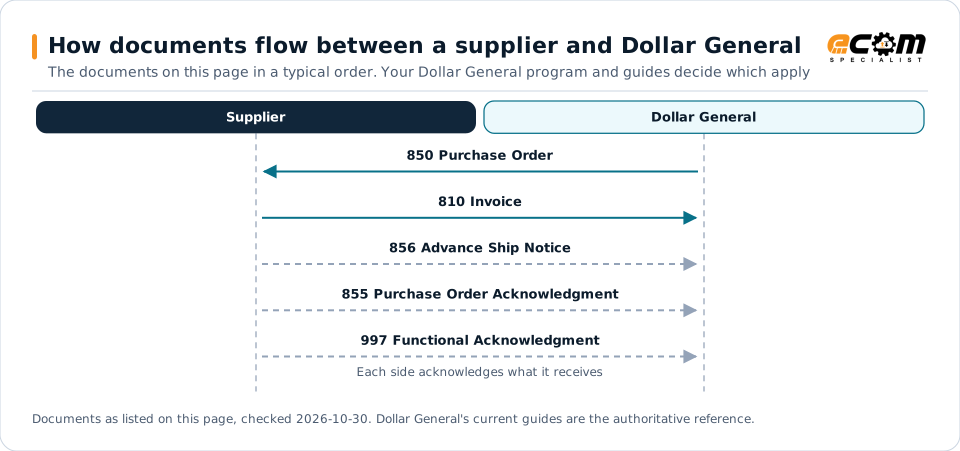
How documents flow between a supplier and Dollar GeneralSequence diagram of documents between a supplier and Dollar General: 850 Purchase Order from Dollar General, 810 Invoice to Dollar General, 856 Advance Ship Notice to Dollar General, 855 Purchase Order Acknowledgment to Dollar General and 997 Functional Acknowledgment to Dollar General.How documents flow between a supplier and Dollar GeneralThe documents on this page in a typical order. Your Dollar General program and guides decide which applySupplierDollar General850 Purchase Order810 Invoice856 Advance Ship Notice855 Purchase Order Acknowledgment997 Functional AcknowledgmentEach side acknowledges what it receivesDocuments as listed on this page, checked 2026-10-30. Dollar General's current guides are the authoritative reference.
How documents flow between a supplier and Dollar GeneralSequence diagram of documents between a supplier and Dollar General: 850 Purchase Order from Dollar General, 810 Invoice to Dollar General, 856 Advance Ship Notice to Dollar General, 855 Purchase Order Acknowledgment to Dollar General and 997 Functional Acknowledgment to Dollar General.How documents flow between asupplier and Dollar GeneralThe documents on this page in a typical order.Your Dollar General program and guides decidewhich applySupplierDollar General850 Purchase Order810 Invoice856 Advance Ship Notice855 Purchase OrderAcknowledgment997 FunctionalAcknowledgmentEach side acknowledges whatit receivesDocuments as listed on this page, checked2026-10-30. Dollar General's current guides are theauthoritative reference.

Read from top to bottom. Solid arrows are documents Dollar General names in its own public documentation; dashed arrows are common practice that this page could not confirm for Dollar General, or acknowledgments. The order is typical, not a Dollar General rule: programs such as vendor direct to consumer use their own documents and timing.

Expand diagram Download SVG

Document by document

What each Dollar General document needs

For each document: what it does for you as the supplier, what Dollar General's own documents say about it (with the source and its date), and general EDI practice that helps, labelled as such. Your Dollar General mapping guide for your version is the final word on fields and codes.

850

Purchase Order

You receive · Domestic warehouse vendors

Every Dollar General order arrives as an 850. It sets the ship date, the arrival date at the distribution center and Dollar General's SKU for each item.

What Dollar General states

General EDI practice

  • Because changes are not re-sent, record agreed changes against the original order in your ERP so the invoice still matches.


How the 850 works in X12

810

Invoice

You send · Domestic and scan based trading vendors

Your invoice goes back as an 810. Dollar General expects valid, complete invoices in its required format.

What Dollar General states

General EDI practice

  • Invoice each shipment against its own purchase order so the invoice, the order and the receipt can be matched.

How the 810 works in X12

852

Product Activity Data

You receive · Scan based trading

Scan based trading vendors get sales and inventory activity as two 852 reports, one at store level and one at distribution center level.

What Dollar General states

General EDI practice

  • Reconcile 852 sales with 820 payments each week; in scan based trading you are paid on what sells.

How the 852 works in X12

Deductions

What Dollar General charges for EDI problems

Dollar General's public overview names the kinds of chargebacks but not the amounts. The rates are in the Domestic Vendor Guide, behind the DG Partners login.

ProblemCharge stated by Dollar GeneralSource
EDI transmission errors and other EDI non-complianceChargebacks; rates in the Vendor GuideSource: Dollar General Domestic Vendor Quick Start Overview, Sep 13, 2011, p. 3
Incorrect product, incorrect information (carton, purchase order number, bill of lading, packing list), quality and supply chain performanceStandard rates plus rework and re-handling chargesSource: Dollar General Domestic Vendor Quick Start Overview, Sep 13, 2011, p. 6
Damaged and unsaleable merchandiseMonthly deduction under the damages allowance program; rates by department in the Vendor GuideSource: Dollar General Domestic Vendor Quick Start Overview, Sep 13, 2011, p. 3

General practice for handling deductions

  • Ask for the current rate table when you get your credentials, and review deductions monthly against it.

Scorecard and audits

How Dollar General measures supplier performance

Dollar General's overview says the Supply Chain Management team sends vendors a periodic scorecard. It names the measures but not the targets.

MeasureTarget stated by Dollar GeneralSource
DC in-stock percentNot stated publiclySource: Dollar General Domestic Vendor Quick Start Overview, Sep 13, 2011, p. 6
Days of supply and DC turnsNot stated publiclySource: Dollar General Domestic Vendor Quick Start Overview, Sep 13, 2011, p. 6
Receipt to sales ratio and X-out dollarsNot stated publiclySource: Dollar General Domestic Vendor Quick Start Overview, Sep 13, 2011, p. 6
Number of non-compliance chargebacks issuedNot stated publiclySource: Dollar General Domestic Vendor Quick Start Overview, Sep 13, 2011, p. 6

Onboarding

Getting set up with Dollar General, step by step

Steps with a source come from Dollar General's own onboarding material; the others are general practice that keeps the project on track.

  1. Send your contact information

    Give contact details for your account executive, two levels above, and any broker to the assistant of the Dollar General VP for your area, copying your buyer.

    Source: Dollar General Domestic Vendor Quick Start Overview, Sep 13, 2011
  2. Get DG Partners access

    Some files, including the Domestic Vendor Guide and EDI Programming Guide, need a user name and password provided by Dollar General.

    Source: DG Partners, Domestic Vendor Information, as checked, Oct 30, 2026
  3. Sign the agreements

    Provide a certificate of insurance and read the purchase order terms; scan based trading vendors also sign the EDI Trading Partner Agreement.

    Source: Dollar General Scan Based Trading Quick Start Overview, Sep 2012
  4. Map and test EDI

    Map the 850, 810 and 997 to the EDI Programming Guide; scan based trading adds the 820, 832, 852 and 855 with penny and 832 tests.

    Source: Dollar General Scan Based Trading Quick Start Overview, Sep 2012
  5. Ship the first order

    Ship complete, as ordered, to the arrival date on the 850, using the carrier Dollar General assigns for collect orders.

    Source: Dollar General Domestic Vendor Quick Start Overview, Sep 13, 2011
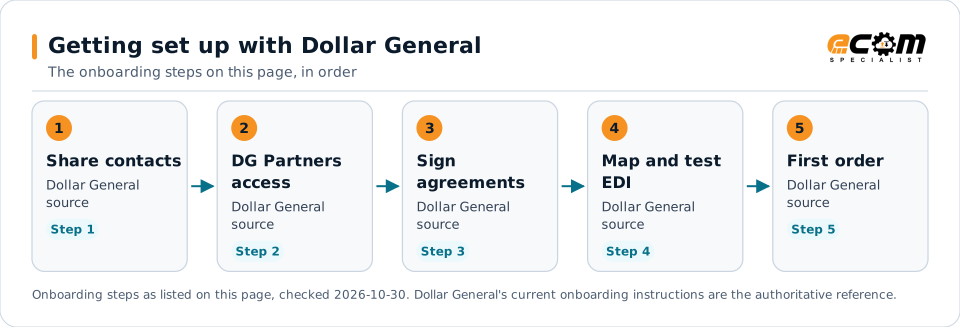
Getting set up with Dollar GeneralFlow diagram of 5 onboarding steps with Dollar General: Send your contact information, Get DG Partners access, Sign the agreements, Map and test EDI and Ship the first order.Getting set up with Dollar GeneralThe onboarding steps on this page, in order1Share contactsDollar GeneralsourceStep 12DG PartnersaccessDollar GeneralsourceStep 23SignagreementsDollar GeneralsourceStep 34Map and testEDIDollar GeneralsourceStep 45First orderDollar GeneralsourceStep 5Onboarding steps as listed on this page, checked 2026-10-30. Dollar General's current onboarding instructions are the authoritative reference.
Getting set up with Dollar GeneralFlow diagram of 5 onboarding steps with Dollar General: Send your contact information, Get DG Partners access, Sign the agreements, Map and test EDI and Ship the first order.Getting set up with DollarGeneralThe onboarding steps on this page, in order1Share contactsDollar General sourceStep 12DG Partners accessDollar General sourceStep 23Sign agreementsDollar General sourceStep 34Map and test EDIDollar General sourceStep 45First orderDollar General sourceStep 5Onboarding steps as listed on this page, checked2026-10-30. Dollar General's current onboardinginstructions are the authoritative reference.

Read left to right, or top to bottom on a phone. 5 of the 5 steps come from Dollar General's own published material and are marked "Dollar General source"; the rest are general practice. Week numbers are given only where Dollar General states them.

Expand diagram Download SVG

Verification

What we checked, and where

Each statement below shows its source and the date we checked it. Statements we could not confirm from an official Dollar General source are labelled as such.

TopicStatementEvidenceChecked
DocumentsEDI is required for domestic vendors, including the 850 purchase order, 810 invoice and 997 acknowledgment.Confirmed on a public Dollar General pageOct 30, 2026
StandardsVendors must comply with VICS standards and the specifications in Dollar General's EDI Trading Partner Agreement.Confirmed on a public Dollar General pageOct 30, 2026
DocumentsAll purchase orders are sent through EDI, and Dollar General does not re-send a purchase order through EDI for changes the vendor requests.Confirmed on a public Dollar General pageOct 30, 2026
PaymentsTransmission errors and other EDI non-compliance may result in chargebacks; rates are in the Domestic Vendor Guide.Confirmed on a public Dollar General pageOct 30, 2026
DocumentsScan based trading vendors must handle the 810, 820, 832, store and DC 852 reports, and the 855 for DC-based items.Confirmed on a public Dollar General pageOct 30, 2026
Supplier portalThe Domestic Vendor Guide, the DSD vendor guide and the EDI Programming Guide require a user ID and password from Dollar General.Confirmed on a public Dollar General pageOct 30, 2026

Available only after supplier login

Dollar General keeps these behind its supplier portal. This guide does not reproduce them; use your own Dollar General access or ask your Dollar General contact.

  • The Dollar General Domestic Vendor Guide, including chargeback rates
  • The EDI Programming Guide
  • The DSD vendor guide and the direct import vendor guide

Not confirmed

We could not confirm these from an official public source, so we do not state them as Dollar General requirements.

  • Whether the 2011 and 2012 quick start overviews still match the current vendor guides
  • The connection method Dollar General requires; third-party claims of AS2 could not be confirmed from an official public source
  • Whether domestic warehouse vendors must send the 856 or 855
  • Chargeback amounts and scorecard targets
  • Testing steps and timelines for domestic warehouse vendors

Checklist

Dollar General EDI readiness checklist

  1. Ask your buyer for DG Partners credentials and read the Domestic Vendor Guide and EDI Programming Guide.
  2. Sign Dollar General's EDI Trading Partner Agreement and confirm the standards it specifies.
  3. Set up the 850, 810 and 997 before your first order.
  4. Handle purchase order changes through the supply chain manager or buyer, since changes are not re-sent by EDI.
  5. Ship each purchase order complete, as ordered, to the arrival date on the 850.
  6. Invoice accurately in Dollar General's required format.
  7. If you join scan based trading, plan for the 832, 852, 820 and 855 and the penny and 832 transmission tests.
  8. Review your Supply Chain Management scorecard each time it arrives.

Connectivity and contacts

How Dollar General connects with suppliers

What Dollar General's public documents say about networks and setup, and the department contacts it publishes for suppliers. Connection credentials and trading-partner IDs are exchanged with Dollar General during setup and are never shown on this page.

What Dollar General states about connecting

Avoid these

Common mistakes with Dollar General EDI

Expecting a revised 850

Dollar General does not re-send a purchase order through EDI for changes you request; agree changes with the right contact instead.

Source: Dollar General Domestic Vendor Quick Start Overview, Sep 13, 2011, p. 5

Partial shipments

Purchase orders must ship complete, as ordered, with one call-in per core purchase order.

Source: Dollar General Domestic Vendor Quick Start Overview, Sep 13, 2011, p. 5

Wrong paperwork details

Incorrect carton information, purchase order numbers, bills of lading or packing lists are chargeable non-compliance.

Source: Dollar General Domestic Vendor Quick Start Overview, Sep 13, 2011, p. 6

Relying on old summaries

Public overviews date from 2011 and 2012. Treat the current Vendor Guide and EDI Programming Guide as the requirement.

General EDI practice, not a stated requirement

Connectivity

Your options for connecting to Dollar General

  • AS2

    Dollar General has not published this in a source we could verify; confirm it with Dollar General.

    General guidance

  • Vendor portal

    Dollar General's vendor portal provides programming guides and vendor information.

    From Dollar General's published documents

Challenges

Common integration challenges

  • Invoice structure

    Invoices must cover one shipment per purchase order or risk rejection.

  • Payment matching

    Payment depends on matching the order, the distribution center receipt and the invoice.

  • Program-specific documents

    Whether ship notices and acknowledgments are required depends on the vendor's program.

Automation options for Dollar General suppliers

Four ways to automate. One foundation.

Dollar General's requirements on this page cover the 850, 810 and 997. ECOM helps you automate them, meet Dollar General's labeling and ship notice requirements, and see what needs action. Dollar General sets its program's rules; ECOM confirms which options fit yours.

PRISM Supply Chain Automation Foundation

One platform beneath every option. Use one, or combine them for different partners and documents.

Compliance and actionable visibility

Connect order processing, shipping documentation, trading partner requirements, and performance monitoring through one coordinated workflow. These capabilities help teams improve shipment accuracy, reduce manual work, address compliance risks, and respond to exceptions before they affect customers.

Discuss Your Trading Partner Requirements

Connect Dollar General documents to your ERP

ECOM integrates Dollar General orders and invoices with your ERP so invoices are generated per order and shipment, reducing rejected invoices and payment delays.

Solution

Order-to-Cash Automation

Automate the order-to-invoice cycle with invoices generated per order and shipment.

Product

PRISM-SCV

Flag orders without invoices and invoices that do not match receipts.

Zero Trust for supplier data exchange

Zero Trust EDI and MFT for your Dollar General connection

Supplier exchanges with Dollar General carry orders, ship notices, invoices and item data. A Zero Trust design assumes no connection, file or user is safe by default.

ECOM has implemented Zero Trust EDI and Zero Trust MFT in retail.

For supplier exchanges this means each supplier and vendor connection has its own scope, orders, ship notices and invoices are verified on arrival, late or altered files are noticed early, and the transfer log helps answer deduction and security-review questions.

  • Authentication

    Every connection proves who it is: partner-specific accounts with SSH keys or certificates over SFTP, FTPS, HTTPS or AS2, never a shared login.

    Business outcome: A lost or reused credential affects one partner, not all of them.

  • Least privilege

    Each partner and user reaches only its own folders, file types and actions. Internal user permissions are managed centrally and reviewed with you.

    Business outcome: A mistake or compromise in one account stays limited to what that account could reach.

  • Isolation

    Partners are kept apart by account and file area. Where your design calls for it, a proxy or DMZ keeps outside connections away from internal systems. The design follows your architecture.

    Business outcome: Outside connections do not land directly on your internal systems.

  • Encryption

    Encrypted protocols in transit and PGP for files at rest. Encryption protects the data. It is one control, and not Zero Trust on its own.

    Business outcome: Less exposure if a file is intercepted or a file store is reached.

  • Certificate and key management

    Partner keys and certificates are managed centrally. Renewal and rotation are planned with you, so an expiring certificate does not stop a flow.

    Business outcome: Fewer outages caused by an expired certificate or key.

  • Monitoring and access controls

    Real-time transfer status and alerts for late, missing or failed files, so unexpected access or a broken flow is seen quickly.

    Business outcome: Late, missing or failed files are noticed early, before they hold up late shipments or deductions.

  • Audit trail

    Every transfer is logged with sender, receiver, time and outcome, which supports your own review and audit work.

    Business outcome: You can answer who sent what and when, for your own audits and partner reviews.

What this means for your data

Supplier and vendor access

Each supplier, 3PL and vendor connection has its own account and limited scope, so one compromised credential cannot reach other partners' data.

Orders, ship notices and invoices

Documents are verified when they arrive and every transfer is logged, so a missing or altered file shows up quickly.

Portals and file drops

Replace shared logins and open folders with named accounts, reviewed on a schedule you set.

Zero Trust is an approach, not a product or a certification. ECOM covers the EDI and file-transfer side. Your identity, network and endpoint controls stay yours, and so does the assessment of your own compliance obligations. ECOM does not guarantee compliance or any security outcome. Dollar General may set its own security requirements, which come first.

Next step

Get help with your Dollar General program

Each request goes to an ECOM EDI specialist with Dollar General's name attached, so the reply starts from your program.

  • Review Dollar General's requirements

    Send us Dollar General's guide or your program details; we explain the documents, rules and options for meeting them.

    Request a requirements review
  • Connect Dollar General to your ERP

    Orders in, ship notices and invoices out, from the ERP and warehouse systems you already run.

    Discuss ERP integration
  • Testing and certification

    Build, test and certify each Dollar General document, then go live with monitoring from the first file.

    Plan testing and certification
  • Shipping labels and ASNs

    Labels and ship notices that match Dollar General's rules, to help avoid receiving problems and compliance deductions.

    Review shipping compliance

Dollar General integration FAQs

Which EDI documents does Dollar General require?

Dollar General's public domestic overview requires the 850 purchase order, 810 invoice and 997 acknowledgment. Scan based trading adds the 820, 832, 852 and 855.

Where are Dollar General's EDI specifications?

The EDI Programming Guide and Domestic Vendor Guide are on DG Partners and need a user ID and password from Dollar General. Carrier specifications are public.

Does Dollar General re-send a purchase order after a change?

No. Its overview says purchase orders are not re-sent through EDI for vendor-requested changes; contact the supply chain manager or buyer instead.

Does Dollar General charge for EDI errors?

Yes. Its overview says transmission errors and other non-compliance may result in chargebacks. The rates are in the Vendor Guide, behind the login.

How does Dollar General measure vendors?

Through a periodic Supply Chain Management scorecard covering measures such as DC in-stock percent, days of supply, DC turns and non-compliance chargebacks.

Is ECOM an approved Dollar General provider?

This page is an integration guide and does not indicate an approval or partnership with Dollar General. ECOM builds integrations to published requirements.

Sources and accuracy

This guide summarizes publicly available information as of November 2026. Dollar General sets its own requirements and can change them at any time; your Dollar General implementation guide, supplier portal or account contact is the authoritative source for your program.

Dollar General documents cited on this page

Learn the general practice

Request Dollar General integration assistance

Tell us about your Dollar General program, documents and ERP. We will outline the connection, mapping and testing plan.