Retail integration

Dollar Tree EDI for merchandise vendors

What Dollar Tree publishes for merchandise vendors about electronic purchase orders and invoices, EDI testing with its onboarding partner, the Ariba vendor portal, shipping portals and international payment terms.

Overview

Understanding Dollar Tree integration

Who this is for: Merchandise vendors selling to Dollar Tree stores and distribution centers in the US and Canada, including import vendors, and the EDI and accounting teams that support them.

Dollar Tree's vendor pages set one clear rule for merchandise vendors: they must receive purchase orders and send invoices electronically. Vendors can do that in two ways, through the Dollar Tree vendor portal on the Ariba Network or through EDI. Vendors choosing EDI complete a testing process with Dollar Tree's onboarding partner to validate the document formats, but Dollar Tree states that vendors do not have to use Dollar Tree's onboarding partner as their EDI tool or network.

Shipping runs through separate portals. Every vendor shipping into Dollar Tree distribution centers in the US and Canada, prepaid or collect, creates an order release in the Custom Vendor Portal and then books a live unload appointment in C3 Reservations. Import vendors send invoices and forwarder's cargo receipts by EDI where they can, with standard terms of 120 days from receipt of both documents.

The public pages do not list X12 transaction numbers or versions for merchandise vendors. The EDI specification on Dollar Tree's site is an Ariba guide for non-merchandise vendors and carries a confidentiality notice, so we did not use it. This guide records what Dollar Tree publishes and lists what we could not confirm.


Requirements at a glance

What Dollar Tree publishes for suppliers

Dollar Tree requires merchandise vendors to receive purchase orders and send invoices electronically, through EDI or its Ariba Network vendor portal. Its public pages do not list X12 numbers or versions for merchandise vendors; formats are validated in testing with Dollar Tree's onboarding partner. We checked the pages on October 31, 2026.

Dollar Tree vendor portal (Ariba Network)

Receive purchase orders, key in invoices and check invoice and payment status, for vendors not using EDI.

Official site

Custom Vendor Portal (CVP)

Order releases for prepaid and collect shipments into Dollar Tree distribution centers.

Official site

C3 Reservations

Live unload delivery appointments at each distribution center, using the CVP shipment number.

Official site

Business units and channels

Dollar Tree business units suppliers trade with

Large retailers often handle each business unit or channel as a separate EDI relationship, with its own documents, guides and setup. Confirm with Dollar Tree which of these you supply before mapping.

Stores and distribution centers

Merchandise divisions

HHP/HBC, Variety, Seasonal and Basics divisions, plus Closeouts and Opportunity Buys, supplying stores in 48 states and 5 Canadian provinces.

Confirmed on a public Dollar Tree page

Stores and distribution centers

Distribution centers (US and Canada)

Distribution centers that every vendor ships into through a CVP order release and a C3 appointment.

Confirmed on a public Dollar Tree page

International

International (import) vendors

Import vendors, who send invoices and forwarder's cargo receipts by EDI where possible, on net 120 terms.

Confirmed on a public Dollar Tree page

Other channel

Non-merchandise vendors

Suppliers of items not for resale, such as supplies and equipment, who integrate with Dollar Tree on the Ariba Network by cXML or EDI.

Confirmed on a public Dollar Tree page

Workflows

Typical Dollar Tree business workflows

General guidance: typical flows in this industry, not Dollar Tree's published process.

Merchandise order-to-cash

  1. 1Receive purchase order
  2. 2Create CVP order release
  3. 3Book C3 appointment
  4. 4Ship to the DC
  5. 5Send invoice
  6. 6Track payment in Ariba

Documents and APIs

Dollar Tree documents by program

General guidance. We could not verify Dollar Tree's EDI requirements from a published source, so these are documents commonly exchanged in this industry, not Dollar Tree's confirmed requirements. Confirm the list, versions and programs with Dollar Tree.

DocumentNameDirectionProgramStatusPurpose
850 Purchase Order You receive from Dollar Tree Not stated General guidance Dollar Tree requires merchandise vendors to receive purchase orders electronically; the X12 number is common practice, not stated on Dollar Tree's pages.
810 Invoice You send to Dollar Tree Not stated General guidance Dollar Tree requires merchandise vendors to send invoices electronically; the X12 number is common practice, not stated on Dollar Tree's pages.
856 Advance Ship Notice You send to Dollar Tree Not stated General guidance Dollar Tree's Ariba training lists ship notices among Ariba Network transactions; the EDI requirement for merchandise vendors is not stated.
997 Functional Acknowledgment Both directions Not stated General guidance Standard acknowledgment of EDI documents; not confirmed on Dollar Tree's pages.
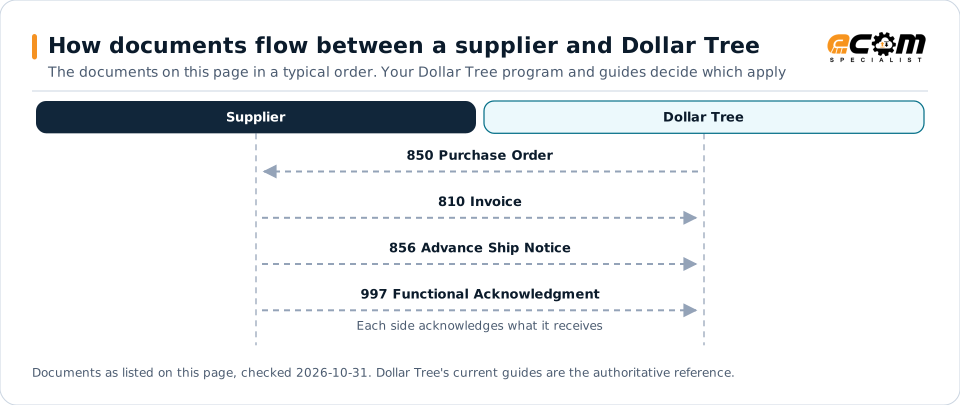
How documents flow between a supplier and Dollar TreeSequence diagram of EDI documents between a supplier and Dollar Tree: 850 Purchase Order from Dollar Tree, 810 Invoice to Dollar Tree, 856 Advance Ship Notice to Dollar Tree and 997 Functional Acknowledgment to Dollar Tree.How documents flow between a supplier and Dollar TreeThe documents on this page in a typical order. Your Dollar Tree program and guides decide which applySupplierDollar Tree850 Purchase Order810 Invoice856 Advance Ship Notice997 Functional AcknowledgmentEach side acknowledges what it receivesDocuments as listed on this page, checked 2026-10-31. Dollar Tree's current guides are the authoritative reference.
How documents flow between a supplier and Dollar TreeSequence diagram of EDI documents between a supplier and Dollar Tree: 850 Purchase Order from Dollar Tree, 810 Invoice to Dollar Tree, 856 Advance Ship Notice to Dollar Tree and 997 Functional Acknowledgment to Dollar Tree.How documents flow between asupplier and Dollar TreeThe documents on this page in a typical order.Your Dollar Tree program and guides decidewhich applySupplierDollar Tree850 Purchase Order810 Invoice856 Advance Ship Notice997 FunctionalAcknowledgmentEach side acknowledges whatit receivesDocuments as listed on this page, checked2026-10-31. Dollar Tree's current guides are theauthoritative reference.

Read from top to bottom. Solid arrows are documents Dollar Tree names in its own public documentation; dashed arrows are common practice that this page could not confirm for Dollar Tree, or acknowledgments. The order is typical, not a Dollar Tree rule: programs such as vendor direct to consumer use their own documents and timing.

Expand diagram Download SVG

Document by document

What each Dollar Tree document needs

For each document: what it does for you as the supplier, what Dollar Tree's own documents say about it (with the source and its date), and general EDI practice that helps, labelled as such. Your Dollar Tree mapping guide for your version is the final word on fields and codes.

850

Purchase Order

You receive

Merchandise vendors must receive Dollar Tree purchase orders electronically, by EDI or in the Ariba vendor portal.

What Dollar Tree states

General EDI practice

  • Confirm the purchase order format and version during onboarding-partner testing before you build the map.

How the 850 works in X12

810

Invoice

You send

Invoices go back electronically, by EDI or keyed in the Ariba vendor portal.

What Dollar Tree states

How the 810 works in X12

Onboarding

Getting set up with Dollar Tree, step by step

Steps with a source come from Dollar Tree's own onboarding material; the others are general practice that keeps the project on track.

  1. Apply as a new vendor

    Complete Dollar Tree's new vendor application, including a certificate of insurance.

    Source: Dollar Tree, New Vendor Application, Oct 31, 2026
  2. Choose EDI or the vendor portal

    Merchandise vendors trade orders and invoices through EDI or the Ariba vendor portal.

    Source: Dollar Tree, Merchandise Vendors, Oct 31, 2026
  3. Test with the onboarding partner

    EDI vendors validate document formats with Dollar Tree's onboarding partner.

    Source: Dollar Tree, Merchandise Vendors, Oct 31, 2026
  4. Set up shipping portals

    Create order releases in the Custom Vendor Portal and book appointments in C3 Reservations.

    Source: Dollar Tree, Logistics, Oct 31, 2026
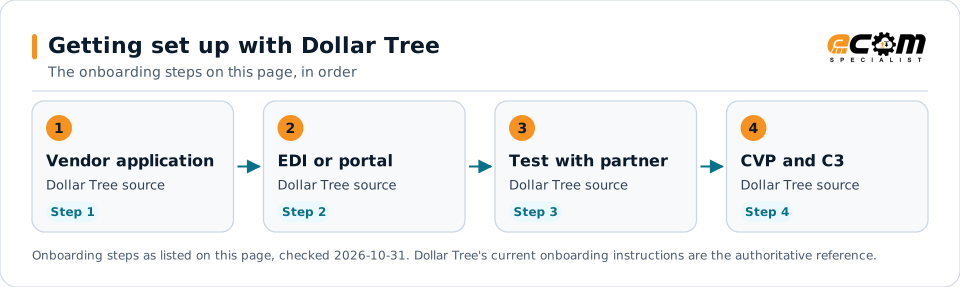
Getting set up with Dollar TreeFlow diagram of 4 onboarding steps with Dollar Tree: Apply as a new vendor, Choose EDI or the vendor portal, Test with the onboarding partner and Set up shipping portals.Getting set up with Dollar TreeThe onboarding steps on this page, in order1Vendor applicationDollar Tree sourceStep 12EDI or portalDollar Tree sourceStep 23Test with partnerDollar Tree sourceStep 34CVP and C3Dollar Tree sourceStep 4Onboarding steps as listed on this page, checked 2026-10-31. Dollar Tree's current onboarding instructions are the authoritative reference.
Getting set up with Dollar TreeFlow diagram of 4 onboarding steps with Dollar Tree: Apply as a new vendor, Choose EDI or the vendor portal, Test with the onboarding partner and Set up shipping portals.Getting set up with Dollar TreeThe onboarding steps on this page, in order1Vendor applicationDollar Tree sourceStep 12EDI or portalDollar Tree sourceStep 23Test with partnerDollar Tree sourceStep 34CVP and C3Dollar Tree sourceStep 4Onboarding steps as listed on this page, checked2026-10-31. Dollar Tree's current onboardinginstructions are the authoritative reference.

Read left to right, or top to bottom on a phone. 4 of the 4 steps come from Dollar Tree's own published material and are marked "Dollar Tree source"; the rest are general practice. Week numbers are given only where Dollar Tree states them.

Expand diagram Download SVG

Verification

What we checked, and where

Each statement below shows its source and the date we checked it. Statements we could not confirm from an official Dollar Tree source are labelled as such.

TopicStatementEvidenceChecked
DocumentsAll merchandise vendors are required to receive purchase orders and transmit invoices electronically, through the vendor portal or EDI.Confirmed on a public Dollar Tree pageOct 31, 2026
OnboardingEDI vendors perform a testing process with Dollar Tree's onboarding partner to validate document formats.Confirmed on a public Dollar Tree pageOct 31, 2026
ConnectivityVendors are not required to use the onboarding partner as their EDI tool or VAN and can keep an existing EDI provider.Confirmed on a public Dollar Tree pageOct 31, 2026
Shipping and labelsA Custom Vendor Portal order release is required for all vendors, prepaid and collect, shipping into US and Canadian distribution centers.Confirmed on a public Dollar Tree pageOct 31, 2026
PaymentsImport vendors are paid net 120 days from receipt of both the EDI invoice and the forwarder's cargo receipt; emailed invoices take 2 to 3 more business days.Confirmed on a public Dollar Tree pageOct 31, 2026

Available only after supplier login

Dollar Tree keeps these behind its supplier portal. This guide does not reproduce them; use your own Dollar Tree access or ask your Dollar Tree contact.

  • Dollar Tree's EDI document specifications for merchandise vendors, validated during onboarding-partner testing
  • Purchase orders, invoices and payment status in the Ariba vendor portal
  • Order releases and appointments in the Custom Vendor Portal and C3 Reservations

Not confirmed

We could not confirm these from an official public source, so we do not state them as Dollar Tree requirements.

  • The X12 transaction numbers and versions Dollar Tree uses for merchandise vendors
  • Whether merchandise vendors must send EDI ship notices
  • Dollar Tree's compliance charges or chargebacks; the pages we read list none
  • Domestic payment terms, which follow each purchase order

Checklist

Dollar Tree EDI readiness checklist

  1. Choose EDI or the Ariba vendor portal before your first Dollar Tree order.
  2. If you choose EDI, contact Dollar Tree's onboarding partner for its testing process.
  3. Keep your existing EDI provider if you have one; Dollar Tree does not require its onboarding partner's services.
  4. Set up ACH payment using Dollar Tree's ACH agreement form.
  5. Create a CVP order release for every shipment into a distribution center.
  6. Book a live unload appointment in C3 Reservations with the CVP shipment number.
  7. Import vendors: send invoices and forwarder's cargo receipts by EDI where possible.

Connectivity and contacts

How Dollar Tree connects with suppliers

What Dollar Tree's public documents say about networks and setup, and the department contacts it publishes for suppliers. Connection credentials and trading-partner IDs are exchanged with Dollar Tree during setup and are never shown on this page.

What Dollar Tree states about connecting

Department contacts Dollar Tree publishes

Listed as Dollar Tree published them. These are Dollar Tree's contacts, not ECOM's; check the source for the current details.

Avoid these

Common mistakes with Dollar Tree EDI

Assuming the onboarding partner's services are required

Dollar Tree's onboarding partner runs its EDI testing, but you can keep your own EDI provider or network.

Source: Dollar Tree, Merchandise Vendors, Oct 31, 2026

Shipping without a CVP order release

Every shipment into a distribution center, prepaid or collect, needs an order release before you book the appointment.

Source: Dollar Tree, Logistics, Oct 31, 2026

Counting import terms from the invoice date

The 120 days start when Dollar Tree has both the EDI invoice and the forwarder's cargo receipt.

Source: Dollar Tree, International Vendors: Invoice Submission, Payment Terms, Contact Information, Oct 31, 2026

Connectivity

Your options for connecting to Dollar Tree

  • EDI through your provider or VAN

    EDI vendors test document formats with Dollar Tree's onboarding partner but may keep their existing EDI provider or VAN.

    From Dollar Tree's published documents

  • Dollar Tree vendor portal (Ariba Network)

    The alternative to EDI: vendors receive orders, key in invoices and check invoice and payment status online.

    From Dollar Tree's published documents

  • Custom Vendor Portal and C3 Reservations

    Required for all vendors shipping into Dollar Tree distribution centers: order releases in the CVP, then live unload appointments in C3.

    From Dollar Tree's published documents

Challenges

Common integration challenges

  • Electronic is mandatory, EDI is optional

    Merchandise vendors must trade orders and invoices electronically, so a low-volume vendor needs either EDI or the Ariba portal from the start.

  • Shipping runs outside EDI

    Order releases and appointments live in separate portals, so shipment data must be keyed or integrated there as well as in EDI.

  • Long international terms

    Import vendors are paid 120 days from receipt of both the EDI invoice and the forwarder's cargo receipt, not from the invoice date.

Automation options for Dollar Tree suppliers

Four ways to automate. One foundation.

ECOM helps you automate them, meet Dollar Tree's labeling and ship notice requirements, and see what needs action. Dollar Tree sets its program's rules; ECOM confirms which options fit yours.

PRISM Supply Chain Automation Foundation

One platform beneath every option. Use one, or combine them for different partners and documents.

Compliance and actionable visibility

Connect order processing, shipping documentation, trading partner requirements, and performance monitoring through one coordinated workflow. These capabilities help teams improve shipment accuracy, reduce manual work, address compliance risks, and respond to exceptions before they affect customers.

Discuss Your Trading Partner Requirements

Next step

Get help with your Dollar Tree program

Each request goes to an ECOM EDI specialist with Dollar Tree's name attached, so the reply starts from your program.

  • Review Dollar Tree's requirements

    Send us Dollar Tree's guide or your program details; we explain the documents, rules and options for meeting them.

    Request a requirements review
  • Connect Dollar Tree to your ERP

    Orders in, ship notices and invoices out, from the ERP and warehouse systems you already run.

    Discuss ERP integration
  • Testing and certification

    Build, test and certify each Dollar Tree document, then go live with monitoring from the first file.

    Plan testing and certification
  • Shipping labels and ASNs

    Labels and ship notices that match Dollar Tree's rules, to help avoid receiving problems and compliance deductions.

    Review shipping compliance

Dollar Tree integration FAQs

Does Dollar Tree require EDI?

Dollar Tree requires all merchandise vendors to receive purchase orders and transmit invoices electronically, either through its Ariba-based vendor portal or through EDI.

Do I have to use Dollar Tree's onboarding partner for EDI?

No. EDI vendors test with Dollar Tree's onboarding partner but Dollar Tree says you are not required to use that partner as your EDI tool or VAN.

What are Dollar Tree's payment terms for import vendors?

Dollar Tree's international vendor guide states standard terms of net 120 days from receipt of both the EDI invoice and the forwarder's cargo receipt.

What do I need before shipping to a Dollar Tree distribution center?

Every vendor shipping into a Dollar Tree distribution center, prepaid or collect, creates an order release in the Custom Vendor Portal and books a live unload appointment in C3 Reservations.

Is ECOM a Dollar Tree-approved provider?

This page is an integration guide and does not indicate an approval or partnership with Dollar Tree. ECOM builds integrations to the requirements Dollar Tree publishes.

Sources and accuracy

This guide summarizes publicly available information as of October 2026. Dollar Tree sets its own requirements and can change them at any time; your Dollar Tree implementation guide, supplier portal or account contact is the authoritative source for your program.

Dollar Tree documents cited on this page

Learn the general practice

Request Dollar Tree integration assistance

Tell us about your Dollar Tree program, documents and ERP. We will outline the connection, mapping and testing plan.