
PRISM UniChannel
Drop-Ship, Supplier and Shipping Automation
Automate fulfillment, speed up delivery and give your supplier network a clear way to work with you. UniChannel routes each order to the right supplier, manufacturer or 3PL, exchanges the documents by EDI or API, and handles labels, tracking and carrier selection.
The big picture
Your order, their warehouse, one view
In drop shipping, the business that sells the product does not ship it. That makes every handoff matter: the order has to reach the right partner, the partner has to confirm it, and tracking has to come back to your customer. UniChannel connects your sales channels, your fulfillment partners and your carriers so these handoffs run automatically.
The order comes from any channel you sell on. UniChannel chooses the partner, exchanges the documents and prepares the shipment. The partner ships with one of the connected carriers, and tracking returns to your channel.
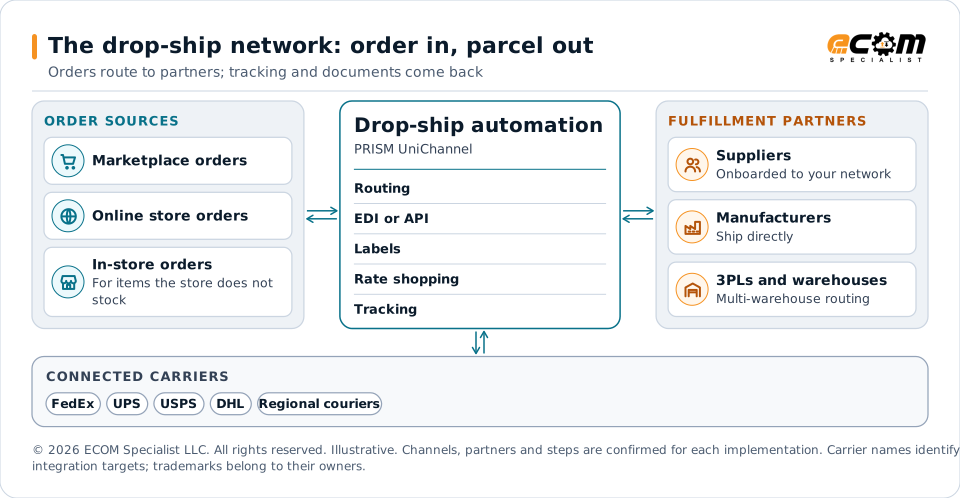
Drop-ship automation
Supplier onboarding and automatic order routing
Bring suppliers on board once, then let orders find them.
-
Supplier onboarding
Bring new suppliers into your drop-ship network through an automated onboarding process, with ECOM’s integration teams guiding the setup.
-
Automatic order routing
Route each order automatically to the supplier, manufacturer or 3PL that should fulfill it, instead of forwarding it by hand.
-
EDI/API acknowledgments, ASNs and invoices
Partners integrate by EDI or API, so purchase order acknowledgments, advance ship notices and invoices come back in a structured form.
-
Real-time order status
Track where each order stands as partners respond, without asking them by phone or email.
-
Exception tracking
See orders that have a problem as it happens, so your team can act on the ones that need attention.
-
Supplier performance
Track how each supplier is performing in real time, using the same order and shipment data.
Shipping label management
Carrier integrations, labels and tracking
Native carrier integrations turn an order that is ready to ship into a labeled, tracked parcel.
-
Carrier integrations
Native integrations with major carriers: FedEx, UPS, USPS, DHL and regional couriers.
-
Labels, packing slips and tracking numbers
Generate shipping labels, packing slips and tracking numbers automatically.
-
Branded shipping labels
Manage branded labels directly from UniChannel.
-
Return labels
Manage return labels from the same place, ready for the returns workflow.
Shipping optimization
Choose the right carrier and the right route
Shipping cost and delivery promise are decided shipment by shipment.
-
Real-time rate shopping
Compare carrier rates in real time for each shipment.
-
Carrier selection by SLA, zone or cost
Select the carrier using the rule that matters for that shipment: the service level, the delivery zone or the cost.
-
Split shipments
Support orders that ship in more than one parcel or from more than one location.
-
Multi-warehouse routing
Route orders across several warehouses rather than from a single location.
-
Address validation
Validate delivery addresses as part of the shipping flow.
-
Last-mile optimization
Optimize the final leg of delivery for cost efficiency.
Practical workflow
How a drop-ship order runs
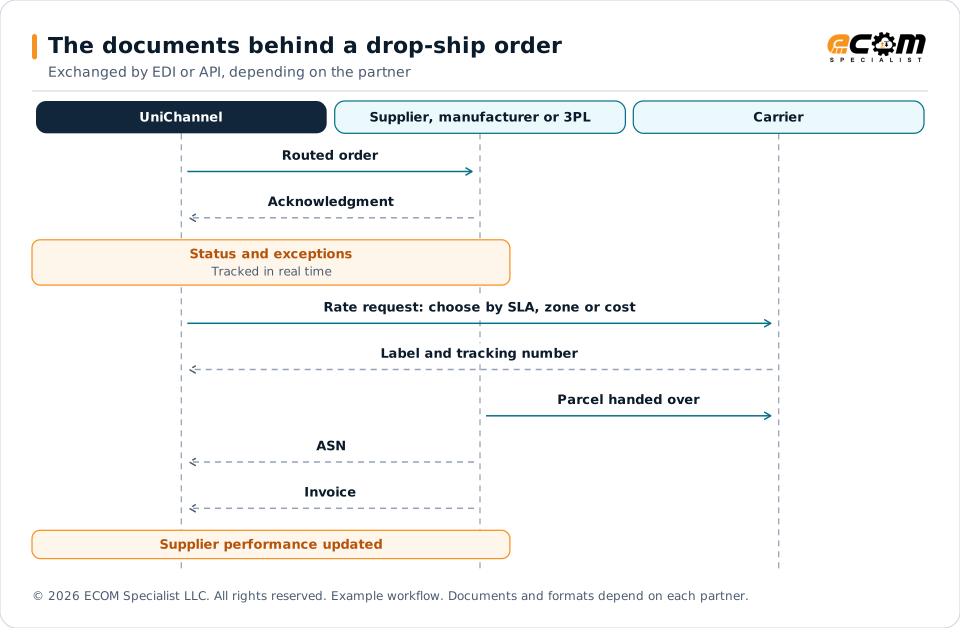
A practical sequence. The documents move by EDI or API, depending on what each partner uses.
- Onboard the partnerA supplier, manufacturer or 3PL joins your network and its connection is set up.
- Route the orderA new order goes automatically to the partner that should fulfill it.
- Receive the acknowledgmentThe partner confirms the order, and any exception becomes visible.
- Choose the carrierRates are compared in real time and the carrier is selected by SLA, zone or cost.
- ShipThe address is validated and the label, packing slip and tracking number are generated.
- Close the loopThe ASN and tracking return to the channel, the invoice is received, and supplier performance is updated.
Each document has a job. The acknowledgment confirms the partner has the order, the ASN says what is shipping, and the invoice closes it. Because every step is recorded, UniChannel can show exceptions and supplier performance from the same data.
Have a specific supplier, marketplace or carrier in mind? ECOM can review your requirements with you.
Business models
What this means for your business model
Supplier fulfillment works differently depending on where you sit in the network.
| Business model | Workflow | Benefit |
|---|---|---|
| Brick-and-mortar retailers | Sell items the store does not stock; connected suppliers ship them to the customer. | Extended assortment through connected suppliers. |
| Direct-to-consumer (.com) sellers | Each online order is routed for doorstep fulfillment, and tracking returns to the store. | Direct delivery with status your team can see. |
| Small independent shops | Easy-to-use automation handles routing, labels and tracking, with guided setup. | Less manual work, and support for compliance and profitability. |
| Distributors | Receive orders from retail partners by EDI or API, and ship from one or several warehouses. | Structured orders and multi-warehouse routing. |
| Suppliers | Receive routed orders, return acknowledgments, ASNs and invoices, and generate labels. | A clear, repeatable way to fulfill for retail partners. |
| Manufacturers | Fulfill routed channel orders directly, with carrier selection and tracking. | A direct route to the end customer, with visible performance. |
Pay-by-scan retailers: see Product, Inventory, Orders and Returns.
Business benefits
The business impact
Faster fulfillment
Orders reach partners automatically, and labels and tracking are generated without manual steps.
Optimized shipping cost
Rate shopping, carrier selection and last-mile optimization address cost on every shipment.
Visibility from order to delivery
One view of status, exceptions and supplier performance across your network.
Illustrative example
A shipping decision, step by step
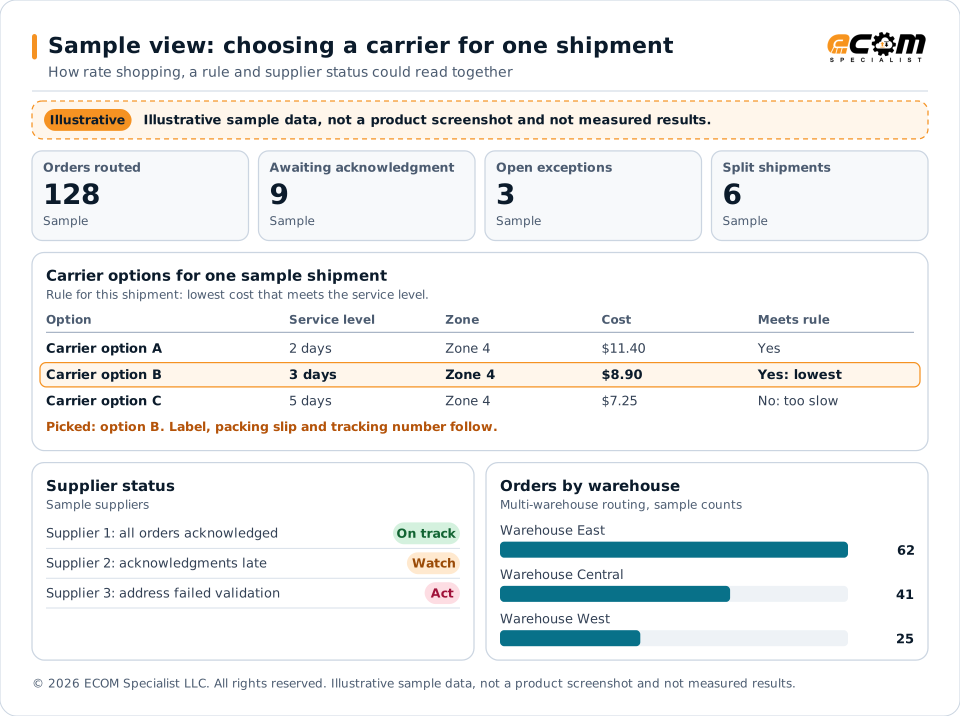
A sample of how an order, its carrier options and its supplier status could be reviewed. The figures are invented to explain the idea.
A sample of the decision behind one label. Three carrier options are compared in real time, and the rule set for this shipment, lowest cost within the service level, picks one. All figures and options here are invented to explain the idea; your rules decide which factor wins.
Frequently asked questions
What is drop-ship automation?
Drop shipping means a supplier, manufacturer or 3PL ships directly to the customer who bought from you. Automation moves the order, acknowledgment, ship notice, tracking and invoice between you and that partner without rekeying.
Do my suppliers need EDI?
Partners integrate by EDI or API for acknowledgments, ASNs and invoices. ECOM reviews what each of your partners can support during onboarding.
Which carriers are supported?
UniChannel has native integrations with major carriers: FedEx, UPS, USPS, DHL and regional couriers. ECOM confirms the carriers and services for your program during scoping.
Can labels carry our brand?
Yes. Branded shipping labels and return labels are managed directly from UniChannel.
How is a carrier chosen?
Rates are compared in real time, and the carrier is selected by service level (SLA), delivery zone or cost.
What happens when an order has a problem?
Status and exceptions are tracked in real time, so your team can see which orders need attention and act on them.
Discuss your drop-ship network
Tell us about your suppliers, your carriers and how orders move today. ECOM will show you how UniChannel can automate the handoffs.
Channels, carriers, ERP versions and enabled capabilities are confirmed for each implementation scope. Third-party names identify integration targets; all trademarks belong to their respective owners. ECOM is not affiliated with or endorsed by them.