
PRISM UniChannel
Product, Inventory, Orders and Returns
One command center for every product, SKU and order. UniChannel keeps listings, stock and orders consistent across marketplaces, warehouses and POS systems, automates returns and refunds, and supports pay-by-scan and vendor-managed inventory.
The big picture
Every product, SKU and order in one place
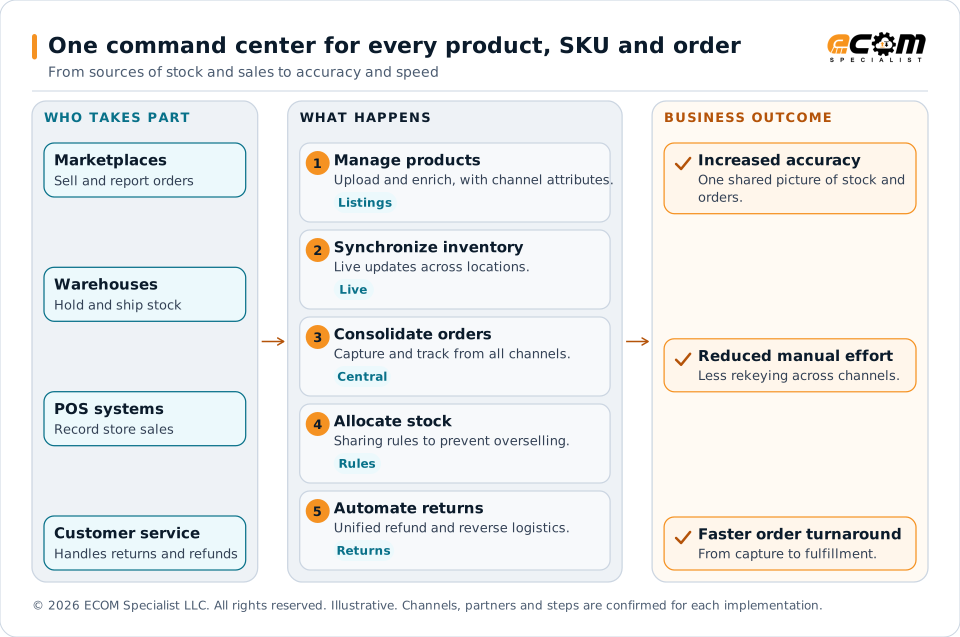
When each channel holds its own stock count, overselling and order errors follow. UniChannel gives every channel and location one shared picture, so a sale in one place updates what is available in the others, and an order can be followed from capture through to any return.
Marketplaces, warehouses, POS systems and customer service all work from the same records. Products, stock, orders and returns are managed in one place, which is what lets accuracy improve and manual effort fall.
Product management
Upload, enrich and optimize listings
-
Product uploads
Upload products for the channels you sell on.
-
Enrichment
Enrich product listings and optimize them for the channels you sell on.
-
Channel-specific attributes
Maintain the attributes each channel asks for, alongside the core product record.
Inventory and stock control
Keep stock accurate, and prevent overselling
-
Live inventory synchronization
Live updates across marketplaces, warehouses and POS systems.
-
Stock allocation
Allocate available stock across channels and locations.
-
Stock-sharing rules
Use intelligent stock-sharing rules to prevent overselling when several channels draw on the same stock.
Orders and returns
From order capture to refund
-
Consolidated order capture
Capture orders from all channels in one central place.
-
Fulfillment tracking
Track each order’s fulfillment, whichever channel it came from.
-
Returns and refund automation
Unified, automated workflows for returns and refunds, shared by customer service.
-
Reverse logistics
Bring the physical return into the same workflow as the refund.
Pay-by-scan business model
Pay-by-scan, vendor-managed inventory and pay-on-sale
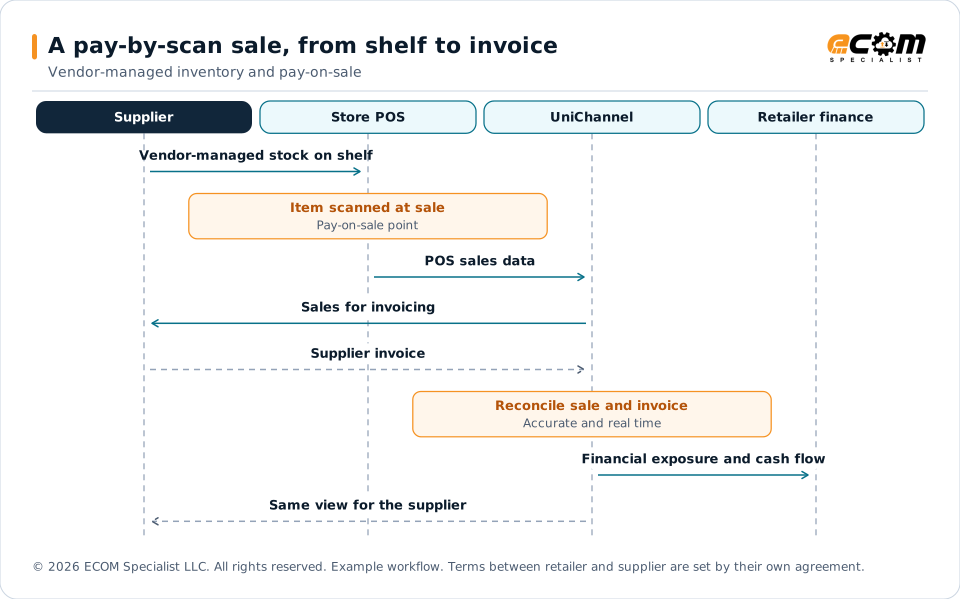
In a pay-by-scan model, the supplier owns the stock on the shelf and the retailer pays when the item is scanned at the register. That makes point-of-sale data the record both sides depend on.
-
Vendor-managed inventory and pay-on-sale
Enable vendor-managed inventory and pay-on-sale workflows between retailers and suppliers.
-
POS-to-supplier-invoice integration
Integrate point-of-sale data with supplier invoicing.
-
Real-time reconciliation
Use that connection for accurate, real-time reconciliation between what sold and what was invoiced.
-
Financial exposure visibility
Help reduce financial risk for both retailers and suppliers.
-
Cash-flow visibility
Improve cash-flow visibility for both retailers and suppliers.
Practical workflow
How a product and an order move
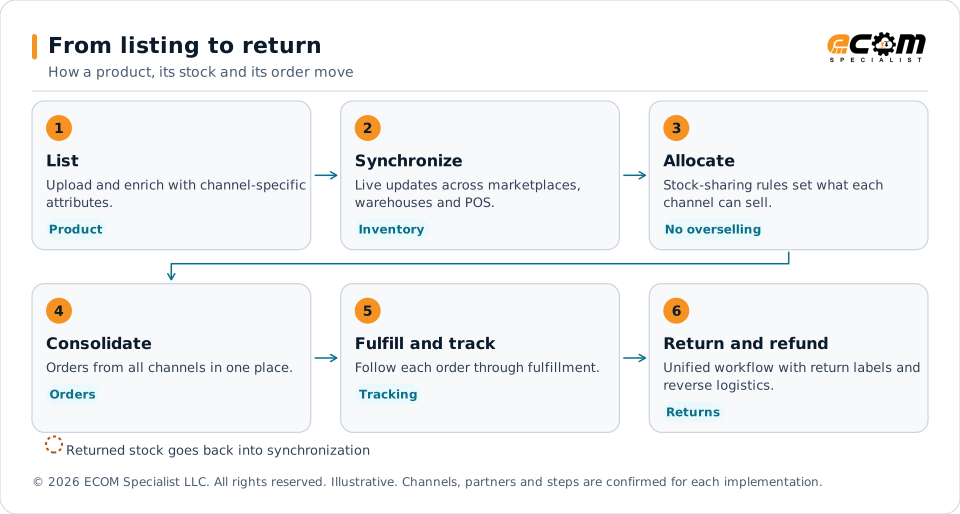
A practical sequence from listing to return. The rules are set for your business during setup.
- List the productUpload, enrich and add channel-specific attributes.
- Share the stockLive updates and allocation rules set what each channel can sell.
- Capture the orderOrders from every channel are consolidated in one place.
- Fulfill and trackThe order is fulfilled and tracked, and stock updates.
- Handle the returnIf it comes back, the return, refund and reverse logistics follow one workflow.
Each step feeds the next. Stock rules decide what can be sold, an order then draws on that stock, and a return can bring it back. Keeping these steps in one workflow is what prevents overselling and keeps customer service informed.
Have a specific supplier, marketplace or carrier in mind? ECOM can review your requirements with you.
Business models
What this means for your business model
Inventory visibility means something different in each model.
| Business model | Workflow | Benefit |
|---|---|---|
| Brick-and-mortar retailers | Keep POS and channel stock in sync, while connected suppliers extend what you can offer. | Inventory visibility beyond the store. |
| Direct-to-consumer (.com) sellers | Show real-time inventory online and consolidate orders from every channel. | Fewer oversells and a clear view of each order. |
| Small independent shops | Use easy-to-use automation for listings, stock and returns. | Less manual effort, and support for compliance and profitability. |
| Pay-by-scan retailers | Vendor-managed inventory, with POS data flowing into supplier invoices. | Accurate reconciliation and lower financial risk. |
| Distributors | Allocate stock across warehouses and channels with stock-sharing rules. | Stock committed with fewer conflicts. |
| Suppliers and manufacturers | Share inventory with retail partners, and invoice from POS data in pay-by-scan programs. | Clear cash-flow visibility and fewer invoice questions. |
Business benefits
The business impact
Increased accuracy
One shared picture of products, stock and orders.
Reduced manual effort
Fewer spreadsheets and less rekeying across channels.
Faster order turnaround
Orders are consolidated and tracked from capture to fulfillment.
Business-model example
A pay-by-scan sale, from shelf to invoice
An example of how one scan at the register can become a supplier invoice and a reconciled record. Actual steps depend on your program.
In pay-by-scan, the scan at the register is the moment of sale, and the moment the supplier is owed. Connecting POS data to invoicing means both sides reconcile against the same record, which helps reduce financial risk and improves cash-flow visibility for each of them.
Frequently asked questions
How does UniChannel prevent overselling?
Inventory is synchronized live across marketplaces, warehouses and POS systems, and intelligent stock-sharing rules control how stock is allocated across channels.
What is pay-by-scan?
Pay-by-scan is a model in which the supplier manages the inventory on the retailer’s shelf and is paid when the item sells. UniChannel enables vendor-managed inventory and pay-on-sale workflows, and integrates POS data with supplier invoicing for reconciliation.
How does pay-by-scan help both sides?
Connecting POS data to invoicing supports accurate, real-time reconciliation. That helps reduce financial risk and improve cash-flow visibility for both retailers and suppliers.
Can returns be automated?
Yes. Returns and refunds follow unified workflows for customer service and reverse logistics, and return labels are managed from UniChannel.
Can each channel have different product attributes?
Yes. Listings can be enriched and optimized with channel-specific attributes.
Talk through your inventory model
Tell us how you hold stock, where you sell and how returns work today. ECOM will help you scope UniChannel around your model.
Channels, carriers, ERP versions and enabled capabilities are confirmed for each implementation scope. Third-party names identify integration targets; all trademarks belong to their respective owners. ECOM is not affiliated with or endorsed by them.